The complete 2025 guide — 6-part prompt formula, multi-reference techniques, First & Last Frame, video extension, dialogue generation, and pro workflows. Everything you need to create cinematic AI videos.
Most people using Seedance 2.0 are leaving serious quality on the table. Not because the model isn't powerful — it's one of the best AI video models available. But because they don't know how to control it properly. This guide covers the full picture: the 6-part formula, how references actually work, plus 4 techniques most people don't even know Seedance supports.
Understanding The 3 Seedance Modes
Seedance 2 — High Quality Mode
Best for final renders.
- Strongest physics engine
- Best prompt adherence
- Less warping & artifacts
- Slower render time
- Highest cost per second
Use for your final render once you've nailed the prompt.
Seedance 2 Fast — Testing Mode
Best for quick iteration.
- 3–5× faster output
- Lower credit cost
- Slightly looser physics
- Less precise adherence
Use to dial in your idea cheaply, then switch to full Seedance 2.
Seedance 2 Open — Creative Freedom Mode
Best for experimental content.
- Mid cost
- Less restrictive filtering
- Great for bypass of strict filters
- Some loosening of restraints
If your prompt keeps being blocked, switch here first.
The #1 Mistake People Make
They write vague prompts.
Bad prompt: "a guy walking in a cinematic scene"
Result:
- Weird motion & warped physics
- Random camera angles
- Inconsistent character
- Unpredictable style
Seedance requires direction. Give it a shot list, not a wish.
The 6-Part Prompt Formula
Subject → Action → Environment → Camera → Style → Constraints
Build every prompt in this exact order. Each part has a specific job.
| Part | What it does | Example |
|---|---|---|
| Subject | WHO or WHAT is in the scene. Character details, clothing, species. | "A woman in a red trench coat" |
| Action | WHAT they're doing. Be specific — verbs matter. | "slowly turns and raises her hand" |
| Environment | WHERE it happens. Location, time of day, weather. | "on a rain-soaked rooftop at night" |
| Camera | HOW we see it. Angle, movement, lens style. | "slow push-in low angle shot, anamorphic" |
| Style | The aesthetic. Film grain, era, color grade. | "neo-noir, 1980s film grain, cyan shadows" |
| Constraints | What the model should AVOID. Prevents common artifacts. | "no camera shake, no blur, no jump cuts" |
Full example — all 6 parts combined:
A lone samurai in a torn black kimono [Subject] slowly draws his sword and exhales [Action] standing in a bamboo forest at dawn with heavy mist [Environment], slow lateral tracking shot at waist height, anamorphic lens [Camera], cinematic 1980s Japanese film grain, desaturated with gold shadows [Style], no camera shake, no motion blur, one continuous shot [Constraints]Use SHORT prompts for:
- Randomness & experimentation
- Surreal or abstract motion
- When you want AI to fill the gaps
Use STRUCTURED prompts for:
- Precise cinematic control
- Character consistency
- Professional output quality
Prompt Length Sweet Spot: 60–100 Words
Most people either write 5 words or 300. Both fail. The sweet spot is 60–100 words.
| Range | Verdict | Why |
|---|---|---|
| Under 30 words | Too vague | The model has too much creative freedom. Outputs are unpredictable. Physics breaks easily. You get a different result every time. |
| 60–100 words | ✓ Sweet spot | Enough direction for the model to understand intent. Not so much it gets confused or ignores parts. Consistent, controlled, high-quality output. |
| Over 200 words | Too overloaded | The model starts ignoring later instructions. Conflict between too many directions creates visual artifacts and contradictions. |
Constraint Commands — Tell It What NOT To Do
This is the most underused technique. Adding explicit negative constraints at the end of your prompt directly reduces the most common AI video artifacts. Always cap your prompt with a "No..." list.
| Constraint command | What it fixes |
|---|---|
| No camera shake | Prevents unwanted handheld wobble in cinematic scenes |
| No motion blur | Keeps fast action crisp and readable |
| No jump cuts | Forces a single continuous shot without edits |
| No text overlays | Prevents AI from adding captions or watermarks |
| No face distortion | Keeps character facial features stable throughout |
| No extra characters | Prevents random people appearing in the background |
| No slow motion | Locks speed to real-time unless you specify otherwise |
| No lens flare | Prevents cheap-looking light artifacts on bright sources |
Prompt with constraint layer applied:
A white owl lands silently on a snow-covered branch at midnight in a frozen pine forest. Moonlight lights the scene from the right. Camera holds completely still, rack focus from the background to the owl's face. Hyper-realistic wildlife photography. No camera shake. No motion blur. No visible breath fog. One static shot.Multi-Reference Prompting
This is a game changer. Upload multiple images or videos, then reference them directly in your prompt. You can use up to 9 images and 3 videos simultaneously.
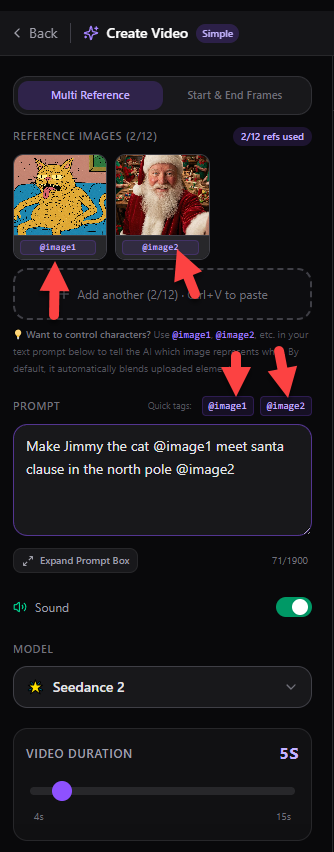
Each uploaded file gets a numbered tag: @Image1, @Image2, @Image3, @Image4, @Video1, @Video2.
Critical rule: always assign every @asset an explicit role.
Two characters in a scene:
Character Melly @Image1 walks down a sidewalk and spots John @Image2 sitting on a bench. Medium tracking shot, cinematic depth of field, warm golden hour light.Character + environment control:
@Image1 is the main character. @Image2 is the interior room environment. Character walks into the @Image2 living room and sits down by the window. Slow push-in, natural light.Character + style + environment:
@Image1 as the main character. @Image2 defines the visual style and color palette. @Image3 is the location exterior. Character walks toward the entrance as rain begins falling.Video reference for camera movement:
Replicate all camera movements from @Video1. Apply them to @Image1 as the character, placed in the environment from @Image2. Match timing and speed exactly.You are now directing scenes, not just generating clips. Every @asset is an actor, a set piece, or a camera blueprint.
First & Last Frame Control
One of Seedance 2.0's most powerful and underused features. You give the model two images — one for the first frame, one for the last — and it generates all the motion between them. You control exactly where the video starts and ends.
@Image1 = first frame (where the video starts) → Seedance fills the motion in between → @Image2 = last frame (where the video ends).
Perfect for:
| Use case | Example |
|---|---|
| Season transitions | Autumn park → same park in deep snow |
| Time-of-day shifts | Pre-dawn skyline → golden sunset same skyline |
| Emotional character arcs | Defeated figure at window → resolute figure on rooftop |
| Product reveals | Product in box → product held open in hand |
| Flower or nature growth | Closed bud in twilight → fully bloomed in sunlight |
| Location transformations | Empty room → same room completely furnished |
Example — season transition:
@Image1 is the first frame: a sun-filled park in autumn, people sitting on benches, leaves on trees. @Image2 is the last frame: the exact same park view covered in deep snow, completely empty. Camera holds completely static. Transition the season naturally. No jump cuts. No dissolve. 8 seconds.Pro tip: For cleanest results, take both images from nearly identical camera angles. The model works best when composition matches — it's transitioning the content, not the framing.
Video Extension
Take any video you've already generated and tell Seedance what happens next. It will continue your clip with perfect visual consistency — same character, same lighting, same camera logic — just a new moment in time.
How to write an extension prompt:
- Upload your existing video as @Video1
- Start your prompt by describing what just happened at the END of the clip
- Then describe what happens next as your new scene continuation
Narrative reveal:
Extend @Video1. Following the running footsteps, the figure reaches a dead end. They turn — back against the wall. The pursuer slows to a stop. A long charged silence. Then the pursuer removes their hood. It's someone the runner recognizes. Hold on the reaction.Action sequence continuation:
Extend @Video1. A motorcycle bursts through the fence at full speed. Top-down bird's-eye camera. The rider drifts wide in the sand before launching off a ramp into the sky over a mountain range. Epic wide shot. Slow motion on the apex.Emotional resolution:
Extend @Video1. After the heated exchange, a long silence. One character lets out an involuntary small laugh. The other tries to hold it together. Then they both break — genuine laughing. Cut to both sitting side by side, calm. Warm ambient light.Key rule: Always anchor the start of your extension prompt to the final moment of @Video1. This creates seamless continuity instead of a visible seam.
Sound & Dialogue Generation
Seedance 2.0 can generate realistic spoken dialogue, natural voice delivery, and ambient audio — including replicating a speaker's vocal timbre from a reference video. This is next-level storytelling.
How to write dialogue:
- Write the actual spoken line in quotes
- Name the speaker before the line
- Describe vocal tone in parentheses
- Add delivery notes after the line
Voice timbre replication:
- Upload a reference video as @Video1
- Reference it in your prompt as the voice source
- Works for any language or accent
- Use a 5-10 second clean audio sample
Comedy dialogue — two characters:
A casual show: 'The Cat & Dog Room.' Cat host (dry, slightly judgmental tone): 'Can we address the sleeping 18 hours thing? Because some of us have actual responsibilities.' Dog co-host tilts head (warm, unbothered): 'I was emotionally supporting the couch cushions.' Warm podcast studio lighting, split-shot framing.Narration with voice timbre from @Video1:
Slow aerial drone shots over an ancient stone city at dawn. Use the vocal timbre from @Video1 for the narration voice. Authoritative, calm documentary tone: 'For three thousand years, this civilization thrived in complete secrecy. What they built here was never meant to be found.' BBC grade, wide aerial shots only.Emotional monologue:
A woman stands at the railing of an old lighthouse at dusk, facing the open sea. She speaks quietly, barely above a whisper (soft, resigned): 'I've been writing letters to you for three years. I think I'm finally ready to stop.' Wind catches her last words. Camera holds completely static.Use Storyboard Images To Control Scenes
A storyboard is a sequence of sketched or illustrated panels used to plan a scene before production. Used in film, anime, and commercials. Each square is one moment in time. Instead of describing everything in words — show the AI what to do.
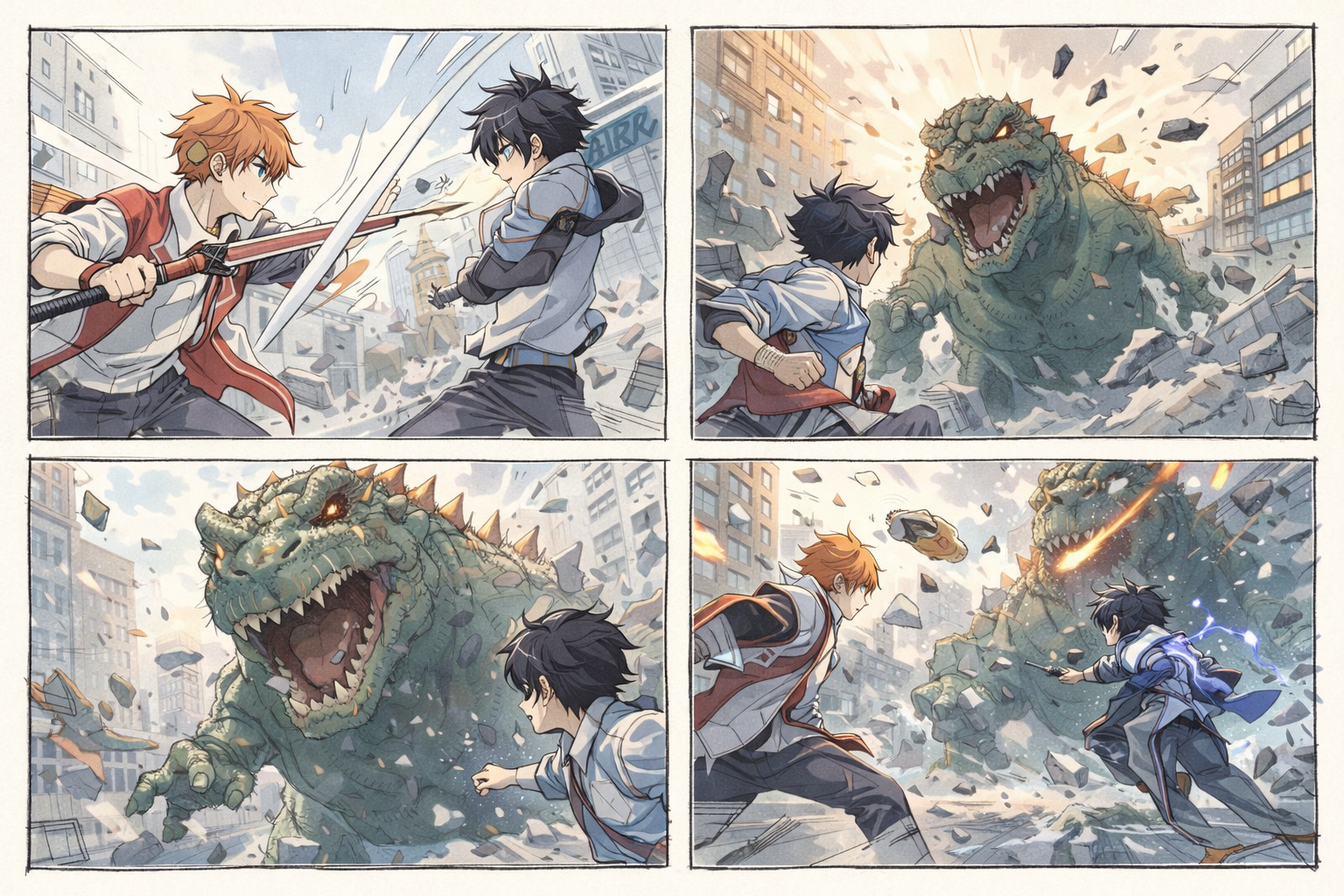
Storyboard sweet spot:
- 4 panels → tight action sequences
- 6 panels → full story arcs
- Combine with character @references
Works great with:
- Action sequences & fight choreography
- Multi-character scene blocking
- Frame grabbing for continuity chains
Step 1: Upload storyboard @Image1 — Step 2: Describe the scene:
Use @Image1 as a storyboard reference. Two anime fighters battle as a giant dinosaur crashes through the city. Cinematic action, dynamic camera, anime style. Follow the sequence shown in the storyboard panels.Pro: storyboard + character references:
Use @Image1 as storyboard reference. Character @Image2 fights @Image3 as the dinosaur from the storyboard attacks. Follow the action sequence and camera angles from @Image1. Cinematic anime action, no camera shake.Frame Grabbing (Scene Chaining Workflow)
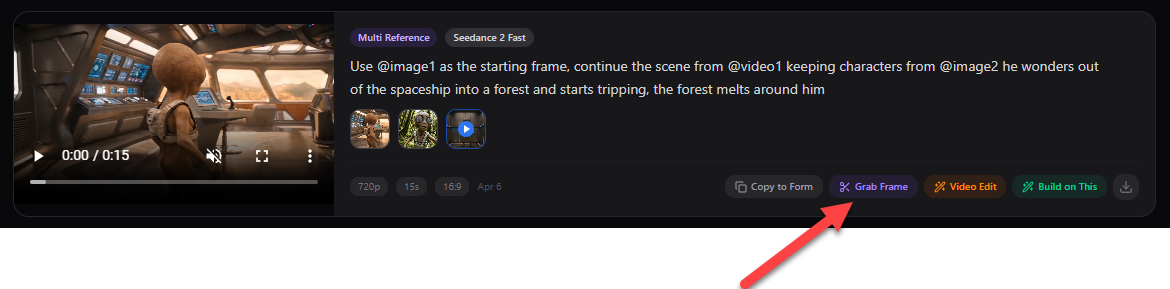
Grab any frame from any video — down to the millisecond. Turn it into a reference image, use it as a start frame, and chain scenes together for full multi-scene continuity. This is how professionals build long-form AI stories.
Step 1 — Grab a frame from your video:
Step 2 — Use it as your next start frame:
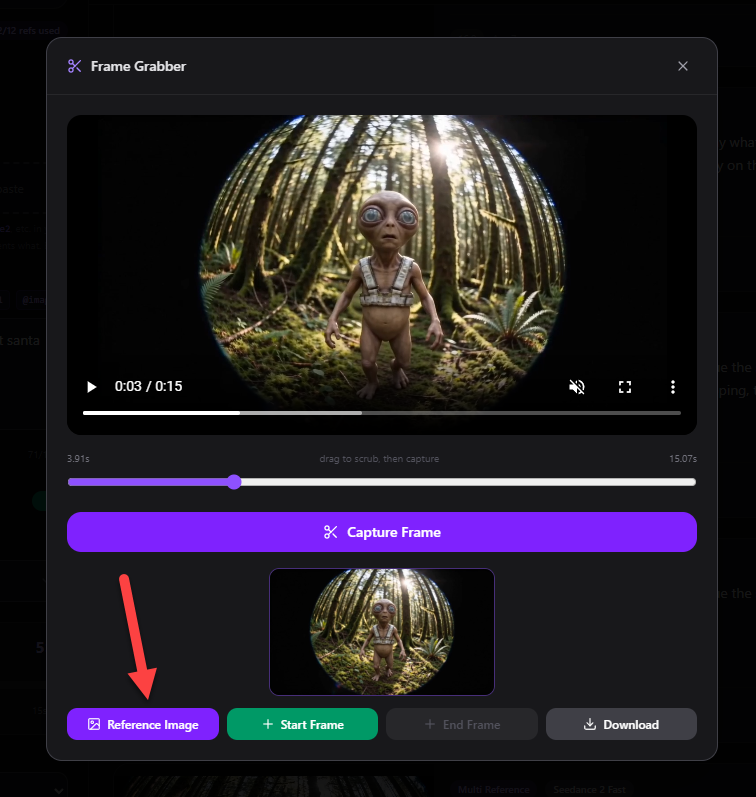
- Turn any frame into a reference
- Use as exact start frame
- Chain scene to scene
- Build full narrative sequences
Chain frame grabbing + First & Last Frame + Video Extension = full cinematic story arcs with consistent characters, lighting, and visual identity across every scene.
What To Do When Prompts Get Blocked
Common triggers that cause generations to be rejected:
- Real faces in reference images
- Copyrighted or branded characters
- Certain flagged words or phrases
- Prompts containing extreme violence descriptors
Do NOT: Spam the same blocked prompt repeatedly — the system can lock you out for extended periods.
DO:
- Rewrite the prompt with different wording
- Remove reference images if they contain real faces
- Switch to Seedance 2 Open mode
- Simplify the constraint list temporarily
JSON Prompting (Bonus Technique)
JSON prompts structure your thinking so you can tweak one parameter at a time. Instead of rewriting a 100-word prompt, you change one field: shot, subject, environment, motion, style. Seedance doesn't require strict JSON syntax — it understands structured formats.
Structure matters more than syntax. Even rough JSON organization improves prompt clarity.
{
  "shot": {
    "composition": "first-person POV walking through a frozen rainstorm in a city",
    "lens": "ultra-wide cinematic lens",
    "camera_movement": "slow forward with subtle sway"
  },
  "subject": {
    "description": "person moving while everything else is frozen",
    "props": "suspended raindrops, frozen pedestrians, stopped cars"
  },
  "scene": {
    "location": "downtown city at midday",
    "environment": "rain frozen mid-air, foggy background"
  },
  "visual_details": {
    "action": "walk through frozen rain, touch suspended water, time resumes explosively"
  },
  "cinematography": {
    "lighting": "soft overcast daylight",
    "tone": "surreal, cinematic"
  },
  "constraints": "no camera shake, no blur, one continuous shot"
}
Pro Workflow (Use This)
- Start with Seedance 2 Fast — Test multiple prompt variations cheaply. Lock your ideal concept.
- Write a 6-part structured prompt — Subject → Action → Environment → Camera → Style → Constraints. Hit 60-100 words.
- Add your reference assets — Upload character images, location refs, or video references. Assign every @asset a role.
- Switch to Seedance 2 for the final render — Full quality mode once your prompt is dialed in. Save credits on testing.
- Grab key frames — Extract the best frames to use as start frames or references for your next scene.
- Build chains with video extension — Take your best clip and extend it forward. Chain scene to scene into a full sequence.
Ready-to-Use Prompts (6-Part Formula)
Copy these directly. All structured with the 6-part formula — modify the subject or style to fit your vision:
Cinematic Rooftop Chase (Text Only)
A masked vigilante in a black tactical suit sprints across wet rooftops during a storm. She leaps between buildings in slow motion. Fast tracking drone shot follows at shoulder level, through rain and neon signs. Blade Runner-esque cyberpunk visuals, desaturated blues and purples. No motion blur, no camera shake, continuous motion.1980s Kung Fu Train Fight (Text Only)
Two martial artists face off on the roof of a moving train at sunset. One performs a spinning aerial kick. Slow motion on impact, rapid zoom cuts to close-up reactions. Shaw Brothers 1980s kung fu film aesthetic, heavy grain, warm amber tones, dramatic shadows. No modern color grading, no CGI look.Emotional Character Arc — Image Ref (Image Reference)
The woman @Image1 stands at an apartment window in morning light, coffee cup in hand. She sees something outside. Her expression shifts from surprised to slowly smiling. Camera pushes in gently from behind over her shoulder. Warm golden light. Cinematic still, quiet moment. No sudden movement, no dialogue.Camera Clone — Video Ref (Video Reference)
Replicate all camera angles, timing, and movement patterns from @Video1 exactly. Place @Image1 as the main character in a modern Japanese convenience store at night. Match every camera cut and motion from the reference. Contemporary realistic style, natural fluorescent lighting. No deviation from @Video1 camera timing.Surreal Forest Melt (Text Only)
A man in a suit walks through a dense pine forest as the environment begins liquefying and shifting around him. Trees bend inward like wet paint. The path beneath him turns to mercury. Camera dollies slowly forward maintaining eye level. Surreal dreamlike visuals, soft muted light, eerie silence implied. No dialogue, no music, continuous shot.Space Station Astronaut (Text Only)
An astronaut floats slowly past a massive curved observation window inside a large orbital space station. The full disc of Earth fills the window below them. A single sharp sunbeam cuts across the interior. Zero gravity drift, extremely slow movement. 4K hyper-realistic NASA aesthetic, absolute silence implied. No fictional interface elements, no label graphics.Want 40+ more curated prompts organized by mode and capability? Browse the full Prompt Library.
Final Thought
The gap between average AI video and genuinely cinematic AI video isn't the model.
It's how you use it.
Apply the full toolkit:
- 6-part prompt structure (Subject → Action → Environment → Camera → Style → Constraints)
- Constraint commands to eliminate common artifacts
- Reference images and videos with clearly assigned roles
- First & Last Frame for precise transition control
- Video extension to build multi-scene sequences
- Frame grabbing for perfect scene-to-scene continuity
You will create content that stops people mid-scroll.
Want free credits? Join our active community on Discord. We give out free credits to active members, run creation contests, share the latest prompt strategies, and post new Seedance techniques as they drop. Join the Discord here.