The quick answer
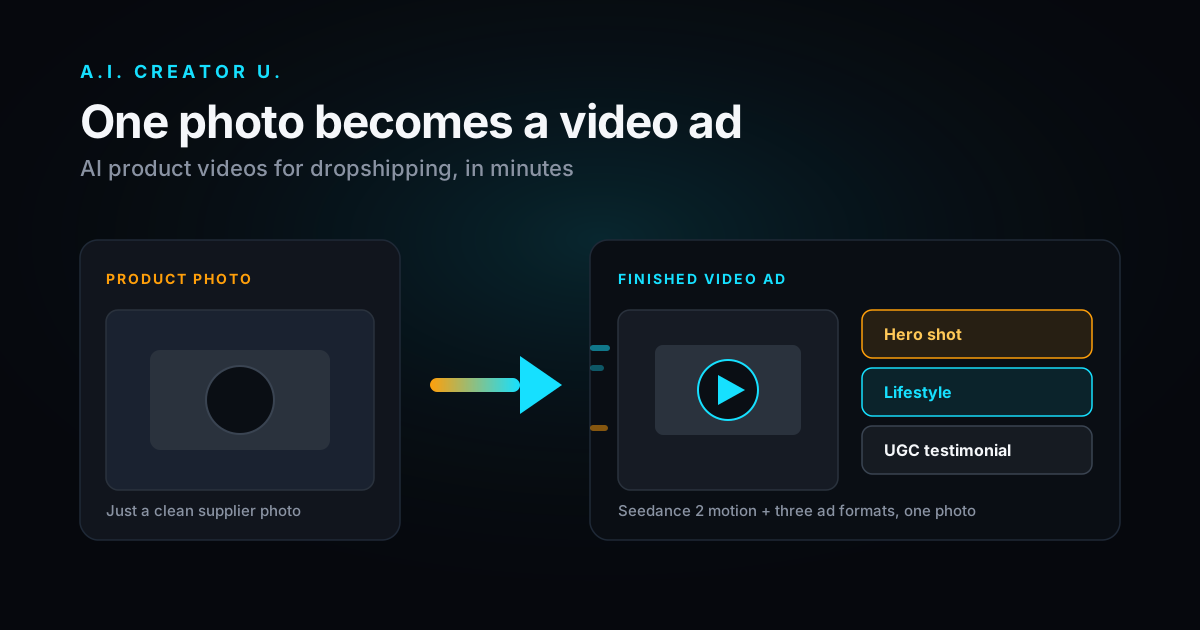
You don't need a camera, a studio, or a videographer to run video ads for a dropshipping product. Upload one clean product photo to an AI video tool, add motion and a camera move, cut it to under 15 seconds, and drop it into TikTok, Reels, or Meta Ads Manager. A.I. Creator U.'s Studio Zero takes a product photo straight to a finished ad, running on Seedance 2.0 for the motion, so the fastest path from "I have a product" to "I have five ad variations to test" is now measured in minutes, not a week of production.
The rest of this guide is the actual workflow: what makes a source photo usable, which ad format to pick for which product, the exact steps to generate and edit, and the mistakes that quietly kill conversion before the ad even gets a fair test.
Why video beats static images for dropshipping
Dropshipping lives and dies on cost per acquisition. Static images stopped winning ad auctions years ago, because every platform now optimizes delivery for watch time and engagement, and video simply earns more of both than a still photo ever will.
Three things make video specifically effective for product sellers.
Motion shows the product working. A jacket photo is fine. A jacket moving in the wind, zipped up on a model, tells the buyer what they're actually getting in a way no product description can. The same logic applies to a phone case snapping onto a phone, a blender jar spinning, a skincare bottle catching light as it's turned. Static images ask the buyer to imagine the product in use. Video shows them.
Native formats win cheaper placements. Vertical, sound on, fast cut video is what the algorithm wants to serve, so you pay less to reach the same audience than you would with a static image competing in the same auction. This isn't a minor efficiency. Over enough spend, it's the difference between a campaign that scales and one that stalls.
You can test angles fast. With video you can spin up a problem or solution cut, an unboxing style cut, and a before and after cut of the same product, and let the platform's optimization pick the winner. That kind of creative testing was simply too expensive to do with filmed content. AI removes the cost barrier, not the strategy.
The catch used to be production cost. Filming a single product ad could eat a week of margin between booking a videographer, shipping a sample, and waiting on edits. AI removes that bottleneck entirely, which is the actual shift worth paying attention to here, not the novelty of the technology itself.
What you need before you start
The barrier to entry in 2026 is genuinely low. Here's the full list.
- A clean product photo. Well lit, in focus, with the product clearly visible against a reasonably simple background. A supplier photo or a phone snapshot both work, as long as the product itself is sharp.
- A clear angle. Decide what story the ad tells before you generate anything. Is it a feature demo, a lifestyle moment, or a UGC style testimonial? Picking this first saves you from generating footage that doesn't match the hook you actually want to write.
- An AI video tool built for product photos. A.I. Creator U. has product photo to video baked directly into Studio Zero, so you're not fighting a general purpose text to video model into behaving like an ad tool.
That's the whole list. No actors, no shipping samples to a studio, no editing suite subscription.
Step by step: turn a product photo into a video ad
Step 1: pick the right source photo
Garbage in, garbage out. Choose the cleanest photo you have: sharp focus, good lighting, and the product filling a meaningful portion of the frame rather than lost in a busy scene. If your supplier image has a cluttered or watermarked background, run it through an AI watermark remover first so you're starting from a clean plate. A watermark or a supplier's logo bleeding through in the final ad is one of the fastest ways to tank buyer trust, and it's completely avoidable.
Step 2: choose your ad format
Match the format to the platform and the buyer's mindset at that moment in the funnel.
Product spin or hero shot works well for top of funnel awareness. It shows the item rotating with dramatic lighting, which reads as premium without needing a script.
Lifestyle or in use puts the product in a real environment (a kitchen counter, a gym bag, a desk setup) so buyers can picture owning it rather than just looking at it.
UGC style testimonial is a creator style talking head holding or using the product. For most dropshippers, this is the highest converting format, because it feels like a recommendation from a person rather than an ad from a brand. The UGC creator tool generates this kind of footage without hiring talent, which is normally where a huge chunk of a dropship ad budget goes.
Step 3: generate the video
Upload your photo and let the AI add motion. With Studio Zero's product shot and ad maker tools, you start from your image and direct the result: camera movement, environment, mood. Under the hood, A.I. Creator U. runs on Seedance 2 models, which produce smooth, coherent motion rather than the warpy, melting frames that gave early AI video a bad reputation. If you want to get specific with camera and lighting direction rather than relying on defaults, our Seedance 2 prompt guide breaks down exactly how to phrase that.
Keep generations short. A 5 to 8 second clip is plenty for a hook, and you can always stitch a few together into a longer sequence if the ad needs it.
Step 4: add the hook and edit for the feed
The first one to two seconds decide whether anyone watches past the scroll. Lead with the most visually surprising or benefit driven moment you have, not your logo and not a slow build up. From there:
Keep it vertical, 9:16, because that's the native shape of the feeds you're buying on. Add captions, because most feed viewing happens with sound off. And cut anything that doesn't earn its place on screen. A tight 12 second ad beats a meandering 25 second one almost every time.
Step 5: spin up variations and test
The real advantage of AI video isn't any single clip, it's volume. Generate three to five versions with different hooks, different environments, and different formats, and let the ad platform spend its way to a winner. This is where dropshippers using AI genuinely pull ahead of everyone still filming: they can test ten creatives in the time it used to take to produce one.
A real workflow, start to finish
Say you're selling a compact travel blender. You start with a supplier photo on a plain white background, run it through the watermark remover since the supplier's logo is stamped in the corner, then generate three clips from Studio Zero: a hero shot rotating on a pedestal with studio lighting, a lifestyle clip of the blender on a kitchen counter with morning light, and a UGC style clip of someone holding it up and talking about how it fits in a gym bag. You cut each to under 12 seconds, add captions to all three, and launch them as separate ad sets with a small daily budget. Within a few days, the platform's own optimization tells you which angle the algorithm wants to spend on, and you kill the other two and scale the winner. Total production time: under an hour. Total cost: a handful of credits and an afternoon, instead of a week coordinating a shoot.
Common mistakes to avoid
Overlong clips. Nobody watches a 30 second AI ad from a brand they don't know yet. Hook fast, make the point, and get out.
Leaving supplier watermarks in. It signals dropshipper more loudly than almost anything else and tanks trust instantly. Clean the source image first, every time.
One creative, big budget. Don't bet a real budget on a single video. Test cheap, find the winner, and only then scale spend behind it.
Ignoring the hook. A beautifully lit product spin that opens slow will still flop if the first second doesn't earn attention. Front load the interesting part.
Mismatched format. A horizontal video running on TikTok or Reels is a wasted impression before anyone even watches it. Always go native to the platform.
Which products work best for this approach
Not every product benefits equally from AI video, and knowing the difference saves you generations. Products with a visible mechanism or transformation (a foldable phone stand opening, a posture corrector being worn, a cleaning gadget lifting dirt) are the easiest wins, because the motion itself does the selling. Products that are purely aesthetic (jewelry, home decor) do better with a lifestyle or ambient lighting angle rather than a mechanical demo, since there's no action to show off. And products that depend heavily on a specific claim (a supplement, a skincare ingredient) usually need a UGC style testimonial format, because the credibility comes from a person vouching for it, not from watching the object move.
If your product doesn't obviously fit one of these buckets, generate one of each and let the ad platform tell you which framing actually resonates. That's cheaper than guessing, and it's exactly the kind of test that was too expensive to run before AI video existed.
Beyond paid ads: organic and retargeting uses
The same clip you generate for a paid campaign has a second life you shouldn't skip. Post the raw hero shot or UGC clip organically on TikTok or Instagram before you even spend a dollar on it. Organic performance is a free signal: a clip that gets genuine engagement without any ad spend behind it is usually a safe bet to scale as a paid creative too, and a clip that flops organically tells you to try a different angle before you commit budget to it.
The same footage also works well as a retargeting asset. Someone who viewed your product page but didn't buy is a warmer audience than a cold scroller, and showing them a UGC style testimonial or a closer look at the product in use, rather than the exact same hero shot they already saw once, tends to move them further down the funnel. Since generating a second or third variation costs a fraction of what a reshoot would, there's little reason to run retargeting with the identical creative as your top of funnel ad.
How much does this actually cost?
Traditional product video means hiring a videographer or shipping samples to a creator, which is real money and days of turnaround per ad. AI video collapses that to minutes and a credit based cost per generation. A.I. Creator U. runs on credits with monthly plans, so you can generate, test, and scale without committing to a production budget up front.
Think about the comparison in terms of what you're actually paying for. A single filmed shoot buys you one angle, shot once, with no room to try a different hook without booking another session. The same budget spent on credits buys you a full round of variations: a hero shot, a lifestyle cut, and a UGC style testimonial, generated, reviewed, and ready to test the same afternoon. The value isn't just the lower price per clip, it's that you can afford to be wrong about which angle will win, because testing five options costs a fraction of committing to one. Check the current pricing and credits page to estimate your cost per creative before you plan a campaign around it.
FAQ
Can I make a video from just one product photo? Yes. AI video tools like A.I. Creator U. add realistic motion, camera movement, and environment to a single still image, so one good photo is enough to produce a finished ad clip.
Are AI product videos good enough for paid ads? Yes, when done well. Use clean source images, keep clips short, and lead with a strong hook. Modern Seedance 2 models produce motion smooth enough to hold up in the feed against filmed content.
What's the best video format for dropshipping ads? Vertical (9:16), sound on optional with captions, and under 15 seconds. UGC style testimonial videos tend to convert best because they feel like recommendations rather than ads.
Do I need editing skills to do this? No. The generation and ad building steps are guided, and basic edits like trimming and captions take minutes. The hardest part is choosing a good hook, which gets easier the more variations you test.
How many variations should I test per product? Three to five is a reasonable starting range: one hero shot, one lifestyle angle, and one or two UGC style cuts. More variations help, but only if your daily budget is large enough to give each one a fair shot at the algorithm before you judge it.
Can I reuse the same generated clip across multiple products? Not directly, since the motion is generated from your specific product photo. But the same format and prompt structure (hero shot, lifestyle, UGC) transfers cleanly across your catalog, so once you've found a winning format for one product, applying it to the next one is fast.
What if my product photo has a busy or low quality background? Clean it up before generating rather than hoping the AI compensates for it. Crop tight to the product where you can, and run cluttered or watermarked backgrounds through the AI watermark remover first. A clean plate consistently produces better motion and a more premium looking result than trying to fix a messy background after the fact.
Should I add music or a voiceover to these ads? It depends on the format. Hero shots and lifestyle clips usually work fine with a trending audio track added afterward in your editor of choice, since the visual is doing the selling. UGC style testimonials need a real voice track, which is why that format is generated as talking footage in the first place rather than silent motion with music layered over it later.
Start making product videos today
You already have the photos. The only thing standing between you and video ads is a tool that turns them into motion fast and cheap enough to test at volume.
Spin up your first AI product video at A.I. Creator U. and turn one product photo into a feed ready ad in minutes.