"Free voice cloning" is the most gamed phrase in AI audio. Half the tools advertising it will happily clone your voice for free — then charge you the moment you try to use the clone. Here's what's actually free in 2026, what the catches are, and which route fits what you're making.
Quick answer
The best free AI voice cloning options in 2026: MiniMax Audio for the closest free clone on the web, Descript for cloning inside a free editing workflow, Chatterbox if you want a truly unlimited open-source model on your own GPU, and Seed Audio in A.I. Creator U. — 15 free credits at signup — if you want the clone plus music, sound effects, and a path straight into video. ElevenLabs, the market leader, doesn't offer cloning on its free plan at all.
Why is "free voice cloning" usually a trap?
Because the business model practically writes itself: let you build the clone free, then paywall the output. Independent testers keep running into the same pattern — Resemble AI, Speechify Studio, Murf, and Invideo AI have all been called out for letting you create a clone at no cost while generation, downloads, or the feature itself sit behind a paid plan. You spend twenty minutes recording a training script and hit a checkout page.
So before you invest time in any "free" cloning tool, check three things: can you generate audio with the clone, can you download the result, and can you use it commercially? Every recommendation below is graded against those three questions — no tool that fails the first two made the list.
New to the tech itself? Start with our plain-English guide to what AI voice cloning is and how it works — this post assumes you know the basics.
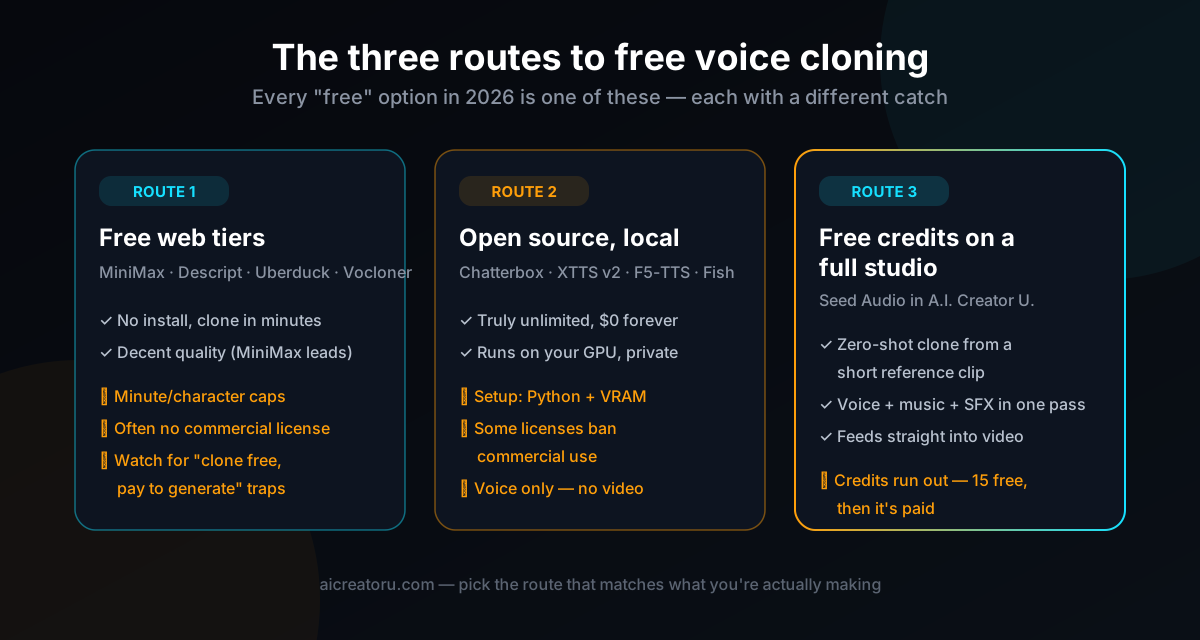
What are the three routes to free voice cloning?
Every genuinely free option in 2026 falls into one of three buckets. Pick the route first, then the tool — it saves a lot of signup-and-delete churn.
Which free web tools are actually worth using?
These are the browser tools where the free tier is real — you can clone, generate, and download without paying. Quality notes lean on independent blind testing published this year (one tester fed the same recording to ten free cloners), plus our own runs.
- MiniMax Audio — the standout. In independent testing it produced the closest voice match of any free web tool — clean audio, natural pacing. The free allowance is roughly 12 minutes of generation and up to three cloned voices. If you only try one free web cloner, make it this one.
- Descript — voice cloning is included on the free plan as part of its editing suite. The clone quality is good-not-great, and you have to work inside a video/podcast project even for pure audio — but if you already edit in Descript, it's the obvious pick.
- Uberduck — a solid runner-up on quality with a genuinely nice voice-management dashboard. Free plan is 300 credits a month and 720 characters per script, personal use only.
- Vocloner — cloning is the whole product, and the free tier works — three voices, 200 characters per script. Output has a slightly muffled quality, but for testing a concept it's frictionless.
And the big asterisk: ElevenLabs — probably the best-known name in AI voice — doesn't include cloning on its free plan. Cloning starts on its cheapest paid tier. Credit where due: it's upfront about that, which is more than most. If you're weighing paid options anyway, our honest comparison of the best voice cloning tools covers the full field.
What about open-source voice cloning?
If you have a decent GPU and don't mind a Python environment, open source is the only route that's free without limits. No credits, no caps, no accounts. The current field:
- Chatterbox (Resemble AI) — the one to start with. MIT-licensed — so commercial use is fine — with zero-shot cloning from about five seconds of reference audio and emotion control. Resemble's own blind study reportedly had listeners preferring it over ElevenLabs, which you should treat as vendor-flavored but directionally interesting.
- XTTS v2 (Coqui) — the long-time community favorite for multilingual zero-shot cloning. Catch: the CPML license is non-commercial, so it's for personal projects only.
- F5-TTS — fast, clean output via flow matching. The code is open, but the released model weights are reported as non-commercial — check before shipping client work.
- Fish Speech / OpenAudio — strong quality and active development, licensed CC-BY-NC-SA — again, non-commercial.
The honest downside: open source gives you a voice, and nothing else. No music bed, no sound effects, no video pipeline — you're assembling the rest of your content stack around a bare model. That's a fine trade for developers. It's a bad trade if your actual goal is finished content.
Want the clone and the finished content? Seed Audio in the Audio Studio clones a voice from a short reference clip and generates the voice, music, and sound effects as one scene — and you get 15 free credits when you sign up. No separate cloning tool, TTS tool, and editor to juggle.
How do you clone a voice free with Seed Audio?
Route 3 is the one we run ourselves, so here's the exact workflow. A.I. Creator U. gives every new account 15 free credits, which is enough to clone a voice and generate real, usable audio — not a locked preview.
- Record a clean reference clip. Ten seconds to a minute of natural speech, no background noise, no music. This one input decides most of your clone quality.
- Open the Audio Studio and pick Seed Audio 1.0. It's the audio model inside A.I. Creator U. — same account and credits as the video tools.
- Attach the clip and tag it @audio1. That locks the voice. You can attach up to three references and tag them @audio1–@audio3 for multi-voice scenes.
- Write the script and direct the delivery. Give it the exact lines in quotes, plus pacing and emotion cues — "slow and confident, pick up energy on the last line."
- Generate, then change one variable at a time. If the read is off, adjust the delivery cue or the reference — not the whole prompt. You'll converge in two or three runs.
Two things no free web tool on this list does: Seed Audio generates the music and sound effects in the same pass as the cloned voice, and the output drops straight into Seedance 2.0 as voice guidance for character video. Full walkthrough in our Seed Audio guide.
Free voice cloning tools compared
| Tool | Free allowance | Best for | The catch |
|---|---|---|---|
| MiniMax Audio | ~12 min of audio, up to 3 clones | Best clone quality of the free web tools | Caps run out fast |
| Descript | Cloning included on the free plan | Podcast/video editing with your voice | Lives inside a video editor |
| Uberduck | 300 credits/mo, 720 chars per script | Quick tests, voice management | No commercial license |
| Vocloner | 3 voices, 200 chars per script | Dedicated cloning, zero friction | Short scripts, no commercial use |
| VEED | 250 characters of script | Voiceovers inside video projects | Tiny script limit |
| ElevenLabs | No cloning on free plan | — | Cloning starts on the paid tier |
| Seed Audio (A.I. Creator U.) | 15 free credits on signup | Clone + full audio scene + video, one place | Credits, not unlimited |
Allowances as reported/observed in July 2026 — free tiers change often, so verify before you build a workflow on one.
The bottom line
Match the route to the job. Testing an idea? MiniMax or Vocloner, five minutes, done. Building a developer pipeline with real volume? Chatterbox on your own GPU — it's the only truly unlimited free option with a commercial-safe license. Making actual content — ads, faceless videos, UGC — where the voice is one ingredient of a finished piece? Use the 15 free credits on Seed Audio, because it's the only free start that ends with a video, not just a WAV file.
Whatever you pick: clone voices you have the rights to, and read the license before anything commercial. Free doesn't mean free-for-all.