Not a deepfake meme, not black magic — a model that learns what makes a voice sound like that person, then reuses it to say anything you type. Here's the plain-English version: how it works, what it actually needs from you, what's legal, and how to try it yourself.
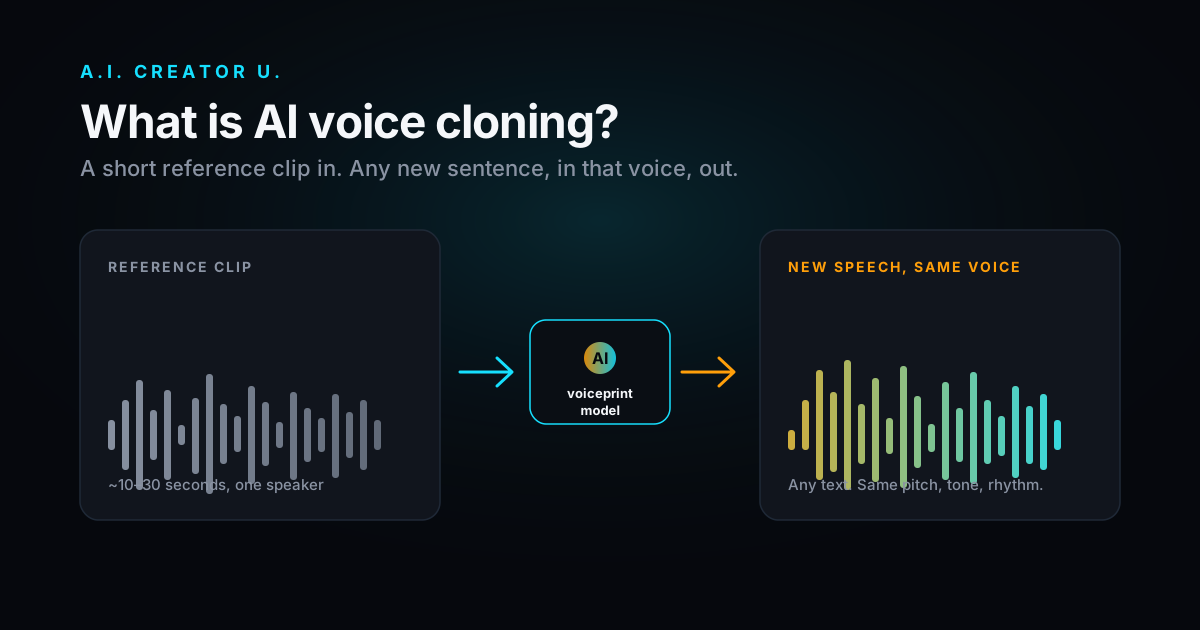
Quick answer: AI voice cloning is a two-step process: a model listens to a short sample of someone's voice and extracts what makes it unique (pitch, tone, rhythm, accent), then a separate generation step uses that "voiceprint" to speak new words — words that person never actually said. Modern tools can do this from as little as a few seconds of audio, which is exactly why it's powerful for creators and risky in the wrong hands.
You've probably run into a cloned voice without knowing it — a dubbed video where the narrator's lips don't quite match but the voice sounds unmistakably like the original creator, or a customer service line that sounds a little too consistent to be a person having a normal day. That's voice cloning, and in 2026 it's cheap enough and good enough that it's become a standard tool in the content stack, not a novelty.
How it actually works
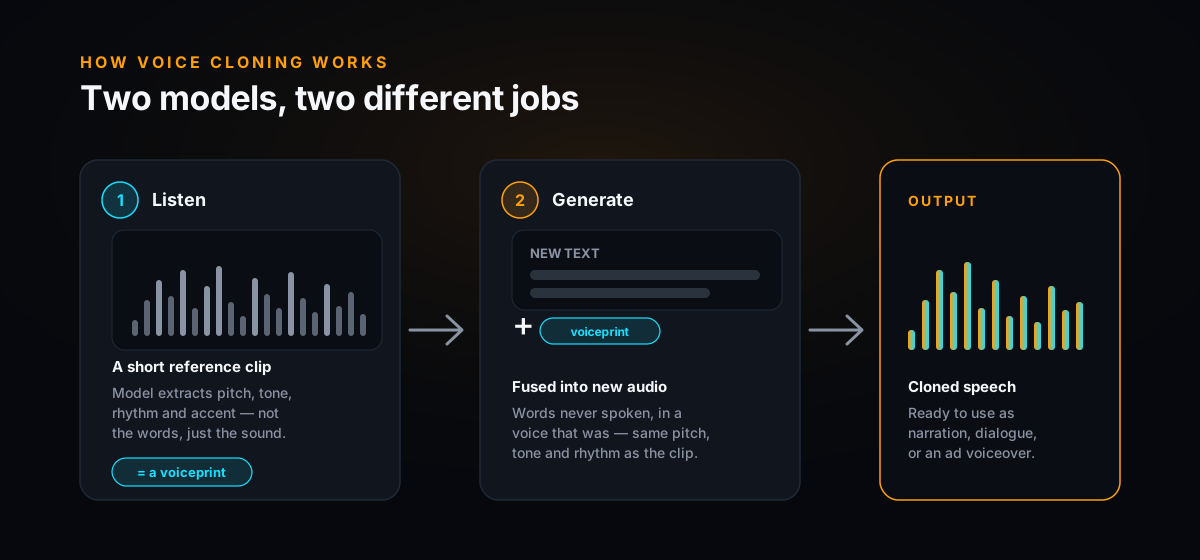
Strip away the marketing and it's two models doing two different jobs. The first listens to your reference clip and pulls out a compact representation of the voice itself — separate from the words being said. Think of it as fingerprinting the sound of the voice: pitch, timbre, pacing, accent, breathiness, all the stuff that makes a voice recognizable in half a second. The second model takes that fingerprint plus new text and generates fresh audio — speech that was never recorded, in a voice that was.
There are two ways this gets built, and the difference matters:
- Zero-shot (instant) cloning. The voiceprint is computed on the spot from your reference clip and fed into a general-purpose model — no training run, no waiting. This is what almost every consumer tool uses now, including Seed Audio. Fast, good enough for most content, and the reason you can clone a voice in the time it takes to upload a file.
- Fine-tuning. The model's actual weights get retrained on your voice data over many steps. Slower and pricier, but it can nail things zero-shot cloning struggles with — unusual accents, singing, heavy emotional range. Most creators never need this tier.
How it works, visually
What you actually need to clone a voice
Less than you'd think. A usable clone can come from a handful of seconds — clean, single-speaker audio with minimal background noise is what the model needs, not a studio session. That said, "usable" and "great" are different bars:
- A few seconds gets you a rough clone — fine for quick tests, not for anything you're publishing.
- 10–30 seconds of clean audio is the practical sweet spot for zero-shot cloning — one speaker, no music underneath, no crosstalk. This is what most tools, including Seed Audio, work best from.
- 30+ minutes is what serious fine-tuned cloning wants — audiobook narrators, dubbing studios, anyone chasing broadcast-quality fidelity.
The quality of the reference clip matters more than the length. Ten clean seconds beats two noisy minutes recorded in a car.
Is it legal? The honest answer
Cloning your own voice, or a voice you have clear permission to use, is standard practice — that's narration, dubbing, accessibility tools for people who've lost their voice, and localization done right. The line gets crossed when a voice is cloned without the speaker's consent, especially to impersonate, deceive, or defraud someone.
That line is getting sharper by the year. Tennessee's ELVIS Act was reportedly the first state law to explicitly extend right-of-publicity protection to AI voice clones, and a growing number of other states have followed with their own deepfake and synthetic-voice statutes. Regulators have also gone after cloned voices used in robocalls and scam calls specifically. None of this is exotic anymore — it's the direction the law is clearly heading, everywhere.
The simple rule: Only clone voices you own or have explicit permission to use. If you're publishing content with a cloned voice, disclose it. That covers you legally and it's just the honest way to use this stuff — the tech doesn't care about intent, but the law increasingly does.
What people actually use it for
- Consistent narration at scale — one narrator voice across dozens of videos or an entire audiobook, without booking studio time for every session.
- Localization — the same script, the same voice, spoken in another language — no need to hire and direct a different voice actor per market.
- Product ads and UGC — a reliable narrator or spokesperson voice you can reuse across every ad variant, paired with a music bed and sound design.
- Preserving a voice — for people who've lost the ability to speak, or for keeping a consistent brand or character voice as a creator or team scales.
Notice what's missing from that list: none of it requires deceiving anyone. That's the difference between voice cloning as a production tool and voice cloning as a deepfake — same technology, and it comes down entirely to whose voice it is and whether you disclose it.
Voice cloning vs. plain text-to-speech
These get lumped together, but they're not the same tool. TTS reads text in a voice the model already knows — usually a stock voice you pick from a list. Voice cloning starts from your reference audio and reproduces that specific person's voice. If you want "a voice," TTS is fine. If you want "this voice," you need cloning. Our Seed Audio deep dive breaks down how that plays out when the model is generating a whole scene — dialogue, music, and effects together — instead of just a voice reading a script.
How to clone a voice yourself, right now
You don't need a separate voice-cloning subscription or a developer API key. It's built into the Audio Studio on A.I. Creator U., using Seed Audio 1.0's zero-shot cloning:
- Open the Audio Studio. Head to the Audio tab and pick Seed Audio 1.0.
- Attach a reference clip. 10–30 seconds of clean, single-speaker audio — your own voice, or one you have permission to use.
- Tag it in your prompt. Reference it as @audio1 (you can attach up to three clips for multi-voice scenes) and write the line you want it to say.
- Direct the delivery. Add pacing and emotion cues right in the prompt — calm, energetic, slow, whatever the scene needs.
- Generate and reuse. Once you're happy with it, the same reference clip works across every future prompt — no need to re-upload or re-train.
Want to hear it done well? The multilingual voice cloning guide walks through cloning a voice once and speaking it in multiple languages — the exact same @audio reference trick, aimed at a different result.
The bottom line
AI voice cloning isn't complicated once you strip the mystery out: learn the voice, generate new speech in it. What matters is whose voice it is and whether you say so. Clone voices you own or have permission to use, disclose synthetic audio when you publish, and it's just another tool in the kit — one that can save a creator hours of studio time or give a seller one consistent narrator across every ad they ship.
It's live in the Audio Studio right now, with 15 free credits to try it on your own voice today.