Best AI Video Editing Software in 2026 (Tested and Compared)
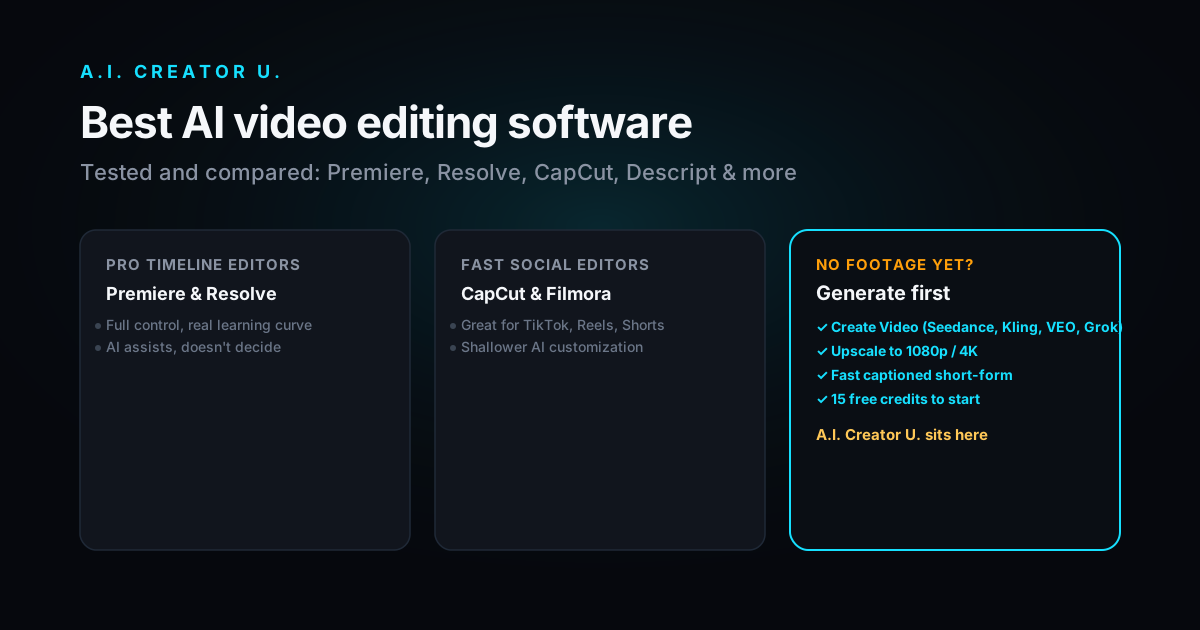
Quick answer: If you cut footage for a living, get DaVinci Resolve Studio (best AI toolkit for the money, $295 one time) or Adobe Premiere Pro (industry standard, AI as a co-pilot). If you make social content fast, CapCut or Filmora will get you further per hour. If talking is your footage, Descript's text-based editing beats a timeline every time. And if you don't have footage yet, none of these help, you need a generation tool first, which is a different job than editing.
Every "best AI video editor" list in 2026 makes the same mistake: it treats editing and generating like the same category. They're not. Editing software takes footage you already shot and speeds up what you do with it, cutting, captioning, reframing, color. Generation tools make the footage in the first place. Confuse the two and you'll buy a $295 color suite when what you actually needed was three AI-rendered product shots by lunch.
This list is the editing side, tested honestly, with the generation gap called out where it matters.
What actually counts as "AI" in a video editor now
Three years ago, AI in a video editor meant auto-captions and maybe a jump-cut detector. In 2026 it means something closer to a junior editor sitting next to you: mask an object with one brush stroke and it tracks itself through the clip, describe the cut you want in plain English and the timeline updates, extend a shot by two seconds because the b-roll ran short. The bar moved. A tool that's still just "auto-caption plus a few filters" isn't really an AI editor anymore, it's a 2022 editor with a marketing refresh.
That's the filter I used below: does the AI change how fast you actually finish a video, or is it a badge on the splash screen.
The comparison
| Tool | Best for | Standout AI feature | Starting price | Free tier |
|---|---|---|---|---|
| Adobe Premiere Pro | Pro/agency work, full control | Generative Extend, AI Object Mask | Subscription, reported ~$23/mo | 7-day trial only |
| DaVinci Resolve Studio | Colorists, best value AI suite | IntelliSearch, CineFocus, Voice to Subtitle | $295 one time (Studio) | Yes, free Resolve is genuinely usable |
| CapCut | Social-first, mobile-to-desktop | Auto-reframe, emotion-aware captions | Reported ~$20/mo (Pro) | Yes, generous free tier |
| Descript | Podcasters, talking-head video | Text-based editing (edit video like a doc) | Reported ~$16 to $24/user/mo | Yes, ~60 min/mo |
| Filmora | Beginners who want AI without the learning curve | AI-generated B-roll and effects packs | Reported ~$50 to $80/yr | Free export, watermarked |
| ChatCut | People who'd rather type than click | Chat-driven agent edits the full timeline | Check current pricing | Limited free tier |
Prices above are reported from current vendor pages and third-party pricing trackers as of this writing; software pricing shifts often, so check the vendor site before you buy.
Adobe Premiere Pro: still the professional default
Premiere earned its "industry standard" label the old way, by being everywhere on real productions, and its AI layer is built for people who already know what a cut is supposed to look like. Generative Extend can stretch a clip by a couple of seconds in 4K when your b-roll comes up short, which used to mean reshooting or awkwardly holding a frame. AI Object Mask turns a single brush stroke into a tracking mask that follows a subject through motion, no more painstaking frame-by-frame rotoscoping. Scene Edit Detection scans a long clip and drops markers where the scene actually changes, which is a small thing until you're logging two hours of interview footage.
The catch is the same one it's always been: Premiere rewards people who already know editing. The AI here assists decisions, it doesn't make them for you. If you're new to editing, the learning curve will eat your first few projects.
DaVinci Resolve Studio: the best AI toolkit per dollar
Resolve is the one I'd point most people toward if price matters and quality can't slip. The free version is not a stripped demo, it's a full NLE with color grading tools other editors charge extra for, and Studio adds the newest AI layer for a single $295 payment instead of a subscription you forget you're paying.
The AI features in the current release earn their keep. IntelliSearch lets you search a project for "the shot where she's holding the red mug" instead of scrubbing a timeline. CineFocus adjusts what's in focus after the shot is already recorded. Voice to Subtitle turns dialogue into a placed caption track in about the time it takes to get coffee, and it's accurate enough to only need light cleanup. uTalk pans dialogue audio to match where a speaker actually sits in frame, which sounds minor until you notice how often that's wrong in amateur edits.
The honest downside: Resolve's interface is built by colorists for colorists, and some of that shows even on the cut page. Give yourself a weekend to get comfortable before a deadline depends on it.
CapCut: the fastest path from phone to finished
CapCut earned the mobile crown by making AI do the boring parts without asking permission first. Shoot on your phone, and the desktop app picks up the same project with motion tracking, auto-reframe for every aspect ratio you need, and captions that adjust styling based on the emotional tone of what's being said, which is a genuinely useful trick for short-form hooks.
Where CapCut loses points is depth. The AI tools mostly offer two or three sliders and not much underneath, and CapCut hasn't been transparent about what it retains from the footage you feed its AI features. If you're editing anything with client confidentiality attached, read the terms before you upload.
For pure speed on TikTok, Reels, and Shorts, though, nothing here beats it.
Descript: edit the transcript, not the timeline
Descript's pitch has aged well: if your video is mostly someone talking, editing text is faster and less error-prone than dragging clips. Delete a sentence from the transcript, and the matching video and audio disappear with it. Overdub can patch a flubbed word without a reshoot. For podcasters and talking-head creators, this alone can cut editing time by more than half compared to a traditional timeline.
It's a narrower tool than the others on this list. If your project is heavy on b-roll, motion graphics, or anything visually complex, you'll outgrow Descript fast and end up exporting into something else anyway.
Filmora: AI without the intimidation
Filmora's whole design philosophy is removing the "I don't know what any of these buttons do" moment. AI-generated B-roll fills gaps without a stock footage subscription, one-click effects packs replace what used to be a keyframing session, and the interface stays out of your way. It's the editor I'd hand to someone who's never opened a video editor and needs a result by Friday.
The tradeoff is ceiling: Filmora won't grow with you the way Resolve or Premiere will if your ambitions get bigger. Treat it as a great starting point, not necessarily a forever tool.
ChatCut: editing by typing instead of clicking
ChatCut is the newest idea on this list and the clearest sign of where the category is heading. Instead of a timeline as the primary interface, you type something like "cut this 30-minute interview to a 5-minute highlight reel and add captions," and an agent executes the full workflow. It's less mature than the others, and it won't replace fine-grained manual control anytime soon, but for rough cuts and first passes it can save real time.
What if you don't have footage to edit yet
Here's the part most "best AI editor" roundups skip, because it breaks the format: every tool above assumes you already have footage. If you're starting from a product photo, a script, or nothing but an idea, none of them help you until step two.
That's a generation problem, not an editing problem, and it's what we built A.I. Creator U for. Our Create Video tool generates clips from a prompt, an image, a reference video, or a voice line, using Seedance 2.0, Kling 3.0, VEO, or Grok depending on what the shot needs. It's not a timeline editor and we won't pretend it is. What it does is skip the "I need footage before I can edit" bottleneck entirely, which for a lot of short-form and ad work is the actual time sink, not the cut.
Once you've got clips, two more pieces round out the workflow without leaving the studio: the Rayus Upscaler cleans generated or existing footage up to 1080p or 4K, and the Brainrot Generator assembles fast, caption-heavy short-form content (fake text threads, story-style videos) without a manual timeline at all. For a lot of social and dropshipping-ad workflows, that combination replaces the need for a traditional editor entirely. For anything that needs precision color work or a complex multi-cam cut, you'll still want Resolve or Premiere downstream, and that's fine, tools aren't supposed to do everything.
New accounts start with 15 free credits, enough to see whether generation actually removes the bottleneck you're fighting before you commit to anything.
How to actually choose
Work backward from what's slowing you down, not from a features list:
- If footage exists and the bottleneck is cutting it down: Resolve for value, Premiere if your team already lives there, Descript if it's mostly talking.
- If footage exists and the bottleneck is speed at volume: CapCut or Filmora, both built to get you from raw clip to posted in one sitting.
- If footage doesn't exist yet: you need a generation tool before an editor helps at all. That's the gap this whole roundup format usually hides.
- If you're not sure which bottleneck you have: time yourself on your next three videos. Track where the hours actually go. Most people guess wrong.
None of these tools are mutually exclusive. A common real workflow in 2026 looks like: generate with a Create Video tool, rough-cut with CapCut, finish color and audio in Resolve. Pick the ones that cover your actual gaps instead of trying to find one app that does everything adequately.
FAQ
Is DaVinci Resolve really free, or is that a trick? The free version is real and full-featured, including color grading tools other editors paywall. Studio ($295 one time) adds the newest AI features, higher-resolution export options, and a few pro-only formats. For most people starting out, free Resolve is enough.
Can I use AI video editing software instead of a video generation tool? No, they solve different problems. Editing software cuts, colors, and captions footage you already have. If you don't have footage, an editor has nothing to work with. Generation tools like Create Video make the clips first.
Which AI video editor is best for TikTok and Reels specifically? CapCut, by a fair margin, mostly because of auto-reframe and its emotion-aware caption styling built specifically for short-form hooks. Filmora is a reasonable second choice if you want a gentler learning curve.
Do I need a subscription, or are there good one-time-purchase options? DaVinci Resolve Studio is the strongest one-time option at $295, no recurring fee. Filmora also offers a perpetual license. Premiere, CapCut, and Descript are subscription-only.
Is it safe to upload client footage to AI editing tools? Check each vendor's data policy before uploading anything under NDA or confidentiality terms. Some tools, CapCut among them, haven't published detailed information about what they retain from AI-processed footage. When in doubt, ask the vendor directly rather than assuming.
Ready to skip the "I need footage first" bottleneck entirely? Generate your first clips with 15 free credits, no editing timeline required. Or see how the underlying models compare in our Seedance 2.0 guide if you want to know exactly what you're generating with before you start.
For more on the generation side of this stack, see our breakdowns of the best free AI video generators, best text-to-video AI tools, and best AI image-to-video tools in 2026.