Quick answer: Every video, image, and audio clip you make in A.I. Creator U. is private by default. Toggling "Publish" on any generation puts it on your own public page at aicreatoru.com/creator/yourname, free, with no credit cost. From there you pick a theme, feature your best five pieces, pin three, group work into collections, and let people follow you. It's the one page that turns a folder of AI generations into something you can actually send someone.
Most people using an AI video or image tool never think past the download button. You make the clip, you post it to TikTok or Instagram, and the platform you built it on disappears from the picture entirely. That's fine if all you want is raw footage. It's a missed opportunity if you're trying to build something that looks like you, a body of work with your name on it, not just a folder of MP4s scattered across apps.
A.I. Creator U. has a page for that. It's easy to miss because nothing forces you into it, but if you've generated more than a handful of characters, shorts, or product shots, it's worth five minutes to set up.
What is an A.I. Creator U. profile page?
It's a public URL, aicreatoru.com/creator/<your username>, that shows off whatever you've chosen to publish from your account. Think of it as the answer to "can I see your work" that doesn't involve scrolling through a camera roll. Nobody sees anything by default. You generate privately, and only the pieces you explicitly flip to "published" ever show up there.
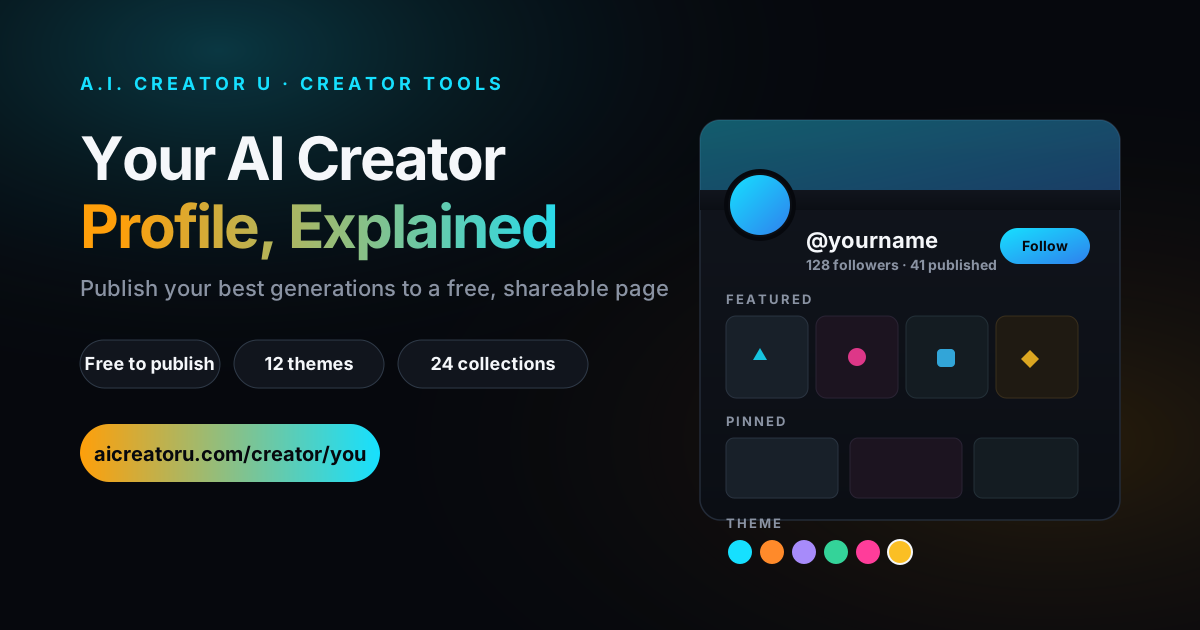
The page itself has a stat header (follower count, published count), a featured carousel up front for your five best pieces, a pinned row for the three you never want buried, owner-curated collections for grouping things by theme or project, and a sortable grid of everything else, latest first or ranked by likes. People can follow you, and they get notified when you publish something new.
Why bother publishing anything?
Three reasons, in order of how much they'll actually matter to you:
It's a portfolio you don't have to build. If you're pitching a client, applying to a UGC program, or just want a link to drop in a bio, "here's my page" beats "let me export a few clips and email them." The page updates itself every time you publish something new.
It's free. Publishing costs zero credits. You already paid to generate the thing; putting it on your page doesn't cost anything extra. The only limit is a soft one, 120 publish/unpublish toggles per 15 minutes, which exists because each toggle runs a real content check, not because anyone's trying to nickel-and-dime you.
Published work is protected from cleanup. A.I. Creator U. runs periodic media retention sweeps on old generations to manage storage. Anything you've published is exempt. If there's a piece you want to keep alive indefinitely without it counting against you, publishing it is the way to do that, not just leaving it sitting in your history.
How to set up your profile (step by step)
1. Claim your username. Go to Account settings and set a username, minimum 3 characters. This becomes your URL: aicreatoru.com/creator/yourname. You can change it later, but only once every 7 days, so don't pick something you'll regret by Thursday.
2. Generate something worth showing. Obvious, but worth saying: the profile only works if there's something good behind it. If you haven't built a character yet, that's usually the fastest way to get a page that looks coherent instead of a grab-bag. Character Studio is the tool most people start with, since a consistent character across five or six pieces reads a lot better on a profile than five unrelated one-offs. If you're still working out what "consistent" actually means in practice, our AI character generator guide covers the drift problem in more depth than this post has room for.
3. Publish your best pieces. From your generation history, hit publish on anything you want public. Each publish runs through an automatic content check (a moderation pass on the thumbnail, title, and prompt) before it goes live, so there's a brief delay, not an instant flip.
4. Feature and pin. You get five featured slots for the carousel at the top of your page, the stuff you want a first-time visitor to see immediately, and three pinned slots that stay at the top of your grid regardless of when you posted them. Use featured for your strongest overall work and pinned for anything time-sensitive, like a piece you're actively promoting.
5. Build collections if you've got range. Up to 24 collections, 100 items each. If you make both faceless story content and product ads, split them into two collections instead of dumping everything into one long scroll. A visitor who clicks through from a TikTok about your product ads shouldn't have to wade past unrelated content to find more of what they came for.
6. Pick a theme. Twelve options, from the default Midnight to Sunset, Emerald, Gold Rush, and a full rainbow "Prism" theme. Every theme is built on a dark base so the site's text and cards stay readable regardless of which one you pick; the difference is the accent color on your Follow button and the glow behind your featured card.
What can you actually put on it?
| Feature | Limit | Notes |
|---|---|---|
| Featured carousel | 5 items | Front-and-center on your page |
| Pinned posts | 3 items | Stay at top of your grid |
| Collections | 24 collections, 100 items each | Group by theme, product line, or series |
| Publishing cost | Free | No credits deducted to publish or unpublish |
| Toggle rate limit | 120 per 15 min | Soft limit tied to the moderation check on each toggle |
| Username changes | Once per 7 days | Minimum 3 characters |
| Themes | 12 | Midnight (default), Cyan Wave, Sunset, Rose Gold, Hot Pink, Violet Night, Emerald, Deep Ocean, Gold Rush, Crimson, Cotton Candy, Prism |
Opening any post takes visitors to its own shareable page rather than a popup, so a link to a single piece works the same way a link to your whole profile does. That matters if you want to send someone one specific video instead of your entire catalog.
Does publishing cost credits or affect my generation limits?
No. Publishing is a metadata flip, not a generation. You already spent credits making the piece; putting it on your public page is free, every time, in both directions (publishing and unpublishing). The only thing that's rate-limited is how fast you can toggle, and 120 times in 15 minutes is far more than anyone actually needs.
What happens to unpublished work?
It stays private and behaves like any other generation in your account: visible only to you, subject to the normal retention rules. Publishing is opt-in and reversible. If you publish something and change your mind, unpublish it and it comes off your page immediately, same free, same no-limit-hit process.
Can I organize my profile by project or niche?
Yes, and this is the part most people skip. Collections exist specifically so you're not forcing every visitor through one undifferentiated feed. If you're running a faceless TikTok story channel alongside a side project doing branded UGC, two collections keep those audiences from tripping over each other. Note that collection links currently route through an ID parameter rather than a clean readable slug (a naming layer is still being finished on the backend), so the link works fine, it's just not as pretty as /creator/you/my-collection-name yet.
Does anyone actually see these pages?
That depends entirely on whether you promote the link, same as any portfolio site. The platform gives you follow/unfollow with notifications when you publish, and a referral code baked into your profile's signup CTA (anyone who signs up through your page link gets tracked back to you), but it doesn't put you in front of new people on its own. Treat it the way you'd treat a Linktree or portfolio site: the page is the destination, you still have to drive traffic to it. Pair it with something like Shorts Studio for the actual distribution engine, then use your profile as the "see more of my work" link in every bio and caption.
Two ways people actually use this
The faceless creator. Say you're running a faceless TikTok channel built around one recurring AI character telling short stories. Every episode gets published, grouped into a "Season 1" collection, with the three strongest episodes pinned so a new visitor lands on your best work first instead of episode one from six months ago. The profile link goes in your TikTok bio. Someone watches a clip, likes it, clicks through, follows, gets notified the next time you publish. That's the whole loop, and none of it required building anything outside the studio.
The seller building proof. If you're making product shots or ad creative for a store, your profile becomes a portfolio you can point a potential client or partner to instead of exporting a folder of MP4s and hoping the email doesn't get lost. Collections split cleanly by product line or campaign, and because publishing is free, there's no reason not to keep a running, curated record of your best work as you make it, rather than scrambling to assemble a reel when someone finally asks to see samples.
Neither of these requires you to do anything you weren't already doing. It's the same generations you already made, put somewhere a stranger can actually find and follow them.
The mistake most people make with this
They generate great content and never publish any of it. The default is private, which is the right default (nobody wants their test generations public), but it means the profile stays empty unless you go back and actively curate. Block out five minutes after your next few generation sessions specifically to review and publish. A profile with twelve carefully chosen pieces and clean collections beats one with ninety unsorted ones, and it beats an empty one by an infinite margin.
The other mistake: publishing everything indiscriminately, including rough drafts and test runs. Your featured five and your pinned three are doing the heavy lifting for a first impression. Curate those hard. Everything else can live in the general grid or a collection, but what you feature is what a stranger judges your whole page by in the first three seconds.
FAQ
Do I need a paid plan to have a public profile? No. There's no purchase gate on the profile feature itself, unlike some tools in the studio that require at least one completed purchase to unlock. Anyone with an account and a username can publish.
Can I remove something after I've published it? Yes, anytime, for free. Unpublishing takes it off your page immediately and it goes back to being private, subject to the normal retention rules that apply to unpublished work.
How is this different from just downloading and posting to social media directly? Social platforms are where your content lives for their audience. Your A.I. Creator U. profile is where it lives for people specifically looking for your work, a resume of everything you've made in one place, with your name and username attached, not scattered across whichever app each individual clip got posted to.
What's the fastest way to get a good-looking profile? Build a character in Character Studio first, generate five or six pieces that use it consistently, publish those, feature your best two or three, and pick a theme that matches your niche's vibe. That's a coherent-looking page in under fifteen minutes, versus publishing whatever's in your history and hoping it reads as a body of work.
Can I change my username if I don't like it? Yes, but only once every 7 days, so treat your first pick as at least a week-long commitment. If you're building an audience around this handle, decide before you publish anything, not after.
If you're building characters worth showing off, start in Character Studio, publish what actually looks good, and let your page do the talking for you.