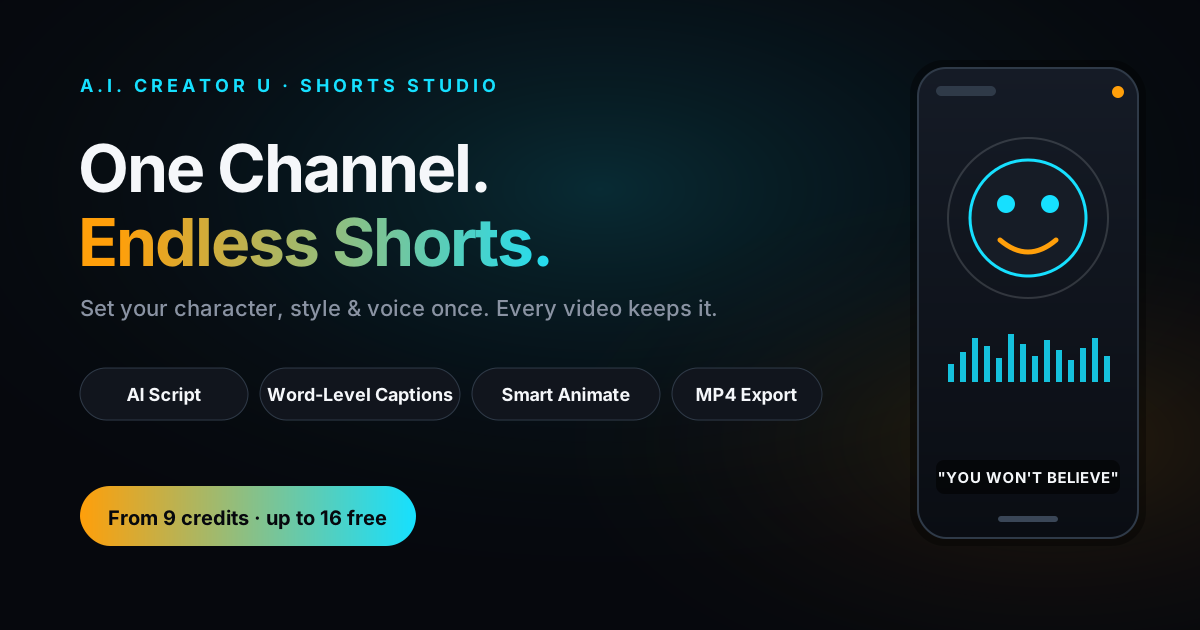
Quick answer: Shorts Studio is A.I. Creator U's short-form video engine, live at /tools/shorts since July 2026. You set up a "channel" once (its characters, visual style, and voice), and every video you build afterward inherits that identity automatically. Paste your own script or let AI write one, choose "Build it for me" or Director mode, and it generates the scene art, an AI voiceover, word-level timed captions, and a finished MP4. A full autopilot build runs from about 9 credits for a 20-second short up to roughly 54 credits for a 3-minute one, before you spend anything on optional motion.
Short-form isn't a phase anymore
YouTube Shorts is reportedly pulling something like 200 billion daily views now, roughly triple where it sat two years ago, and industry trackers put short-form at close to 43% of all social video consumption in 2026. Seventy-one percent of marketers say it's the format with the best ROI of anything they run. None of that is news to you if you're already posting. What's harder is the actual production math: a channel that posts daily needs a script, a consistent look, a voice, timed captions, and an export, every single day, without the look drifting video to video.
That consistency problem is exactly what Shorts Studio is built to solve, and it's the reason it's structured differently from A.I. Creator U's other short-form tools.
What Shorts Studio actually is
Most AI video tools treat every generation as a blank slate. You upload a reference, write a prompt, get a clip, and start over next time. Shorts Studio flips that: the first thing you do isn't make a video, it's create a channel.
A channel is a persistent identity container: your characters, your visual style, and your default voice, saved once and reused by every video inside it. Set it up and every future short automatically keeps the same look and sound, the way a real channel does, without you re-describing your character or re-picking a style each time you sit down to post.
Inside a channel, individual videos come in two flavors, tagged right in the editor: SHORT (organic content for your feed) or AD (creative built for paid placement). They share the same production pipeline, but ad-tagged videos unlock one extra feature we'll get to below.
Setting up a channel: three things, once
Getting a channel running is three decisions, and none of them repeat:
- Visual style. Pick a preset look or describe your own. Once it's locked, every scene image in every video from that channel keeps the same style automatically, so episode 40 still matches episode 1.
- Characters and assets. Attach the characters (or products) that should recur. This is where a channel earns its name: the same face, the same mascot, the same product, shows up consistent across every video without redescribing it.
- Script and voice. Paste your own script (free) or pick a format (story, listicle, motivational, etc.) and let AI write a hook-first script built for retention. Every line becomes one scene, so a tighter script means a tighter cut.
Set those three once and you're building videos, not rebuilding a channel every time.
Two ways to build: autopilot or Director
Once a script is locked, Shorts Studio gives you two paths, and it's an honest choice, not a fake one:
"Build it for me" (Simple mode) is one button that spends a known, quoted amount up front. It generates every remaining scene, animates a handful of key moments automatically, varies the pacing, and lands you on a finished, exportable video. You see the total cost before you commit to it.
Director mode hands you the same steps but interactively: generate scenes at your own pace, choose exactly which beats get motion, fine-tune anything on the timeline. You pay per action instead of one lump sum: 1 credit per scene image, credits per animation depending on the model, 1 credit to export.
Neither is "the pro version." Autopilot is faster when the AI's first pass is good enough, which is most of the time for a daily-post cadence. Director mode is for the video you actually care about getting exactly right.
What a Shorts Studio video actually costs
Every credit price below comes straight from the pricing model in the app, not a guess. A build is priced by length: longer scripts get more scenes (roughly one scene every 4 seconds of runtime), and each scene is one AI image plus its slice of the voiceover.
| Length | Scenes | Voiceover | Script + plan | Export | Total (autopilot) |
|---|---|---|---|---|---|
| 20 sec | 5 | 1 cr | 2 cr | 1 cr | ~9 credits |
| 30 sec | 8 | 1 cr | 2 cr | 1 cr | ~12 credits |
| 45 sec | 11 | 2 cr | 2 cr | 1 cr | ~16 credits |
| 60 sec | 15 | 2 cr | 2 cr | 1 cr | ~20 credits |
| 90 sec | 23 | 3 cr | 2 cr | 1 cr | ~29 credits |
| 120 sec | 30 | 4 cr | 2 cr | 1 cr | ~37 credits |
| 180 sec (max) | 45 | 6 cr | 2 cr | 1 cr | ~54 credits |
That's the full pipeline: script, scene plan, every scene image, the AI voiceover, and the export, with nothing animated yet. Scripts top out at 3 minutes; anything shorter than 20 seconds still gets a minimum of 4 scenes so it never plays like a slideshow.
One detail worth knowing: A.I. Creator U prices Shorts Studio credits against the worst-case value of a credit in your pack, with a fixed margin on top. In plain terms, it's built so a Shorts Studio generation never quietly costs you more than the same generation would in another tool at the same credit price. That's not marketing copy, it's how the pricing function in the code is actually written.
Smart Animate: paying to move only what deserves it
A still image for every scene works, but a short with a couple of moments that actually move reads a lot less static. Smart Animate is the tool for that, and it's priced in two steps on purpose.
First, Smart Animate costs 1 credit flat to plan. It reads your script and decides, scene by scene, which ones deserve a still image, a short animated clip, or a chained motion sequence, based on what's actually happening in the narration. You see the full plan and its total price before anything generates.
Once you approve, each animated scene is billed separately:
| Motion type | Typical cost | Best for |
|---|---|---|
| Smart Animate plan | 1 credit (flat, one-time) | Deciding what's worth animating before you spend on it |
| Short clip (per ~4-second scene) | ~2 credits | A single scene that needs to move |
| Continuous chain (~8-second clip) | 6 credits flat | Motion that has to carry smoothly across a cut, since this is the one model that actually honors a real last frame |
You never get a surprise bill: the plan step exists specifically so you approve the total before a single clip renders.
Hook Lab: split-testing your intro without rebuilding the video
This is the feature that gives away Shorts Studio's dual purpose. Tag a video as an AD and you unlock Hook Lab: the AI writes three alternate opening lines alongside your script, you can paste a fourth of your own, and you can select several to spin up sibling videos, one per hook, that all reuse the same body scenes. Creating the variant is free; each sibling only pays for its own hook image, its own voiceover line, and its own export.
That's meaningfully different from most "AI ad generator" tools, which make you regenerate the whole spot to test a new opening line. Here the hook is the only thing that changes.
Getting it out the door
When you're done, export is a flat 1 credit no matter how long the video runs, since rendering happens on A.I. Creator U's own infrastructure rather than being billed per second like generation is. The output is an MP4 with word-level, burned-in captions already timed to your voiceover, cut to three aspect ratios (9:16, 16:9, 1:1) depending on where it's headed: Shorts, Reels, TikTok, or a square feed post.
If you'd rather narrate it yourself, you don't have to use AI voiceover at all. Upload your own recording and Shorts Studio force-aligns and timestamps it against your script for a flat 1 credit, skipping the per-character TTS cost entirely. That's a real option in the editor, not a workaround.
Shorts Studio vs. Brainrot vs. Story Generator: pick by format, not by "which is better"
A.I. Creator U has three tools that all end in a short-form video, and they're built for different jobs, not competing versions of the same thing:
Our Brainrot Generator is for fast, meme-native, single-video content: no channel setup, no persistent identity, just a quick format that leans into the chaotic aesthetic on purpose. Our AI story video tool is built around one continuous narrated story per video. Shorts Studio sits above both of them: it's the only one where the channel itself, characters, style, voice, persists across every video you make from here forward, which is what actually matters once you're posting daily instead of once.
If you're building an audience and need episode 40 to look like it belongs next to episode 1, Shorts Studio is the tool built for that specific problem.
A real build, start to finish
Say you're launching a channel around a single recurring AI character who reacts to weird facts. Setup: pick a style preset, attach your Character Studio persona as the channel's character, set a default voice. That's the one-time part.
For video one, you paste a 45-second script (or let AI write one in that format). You hit "Build it for me," see a quoted total of roughly 16 credits, and confirm. Eleven scene images generate with your character in the same style throughout, the voiceover renders, captions get timed word by word, and the cut assembles itself. You run Smart Animate for 1 credit, it recommends animating the two highest-impact scenes, you approve the plan at about 4 more credits, and you export for 1. Call it 21 credits, start to finish, for a video that's ready to post the moment it's done rendering.
Tomorrow's video reuses the same channel. No re-uploading your character, no re-picking a style. That repeatability is the entire point.
FAQ
What is Shorts Studio? It's A.I. Creator U's short-form video tool built around a persistent "channel" (your character, visual style, and voice, set once) instead of one-off generations. It writes or takes a script, builds scene art, generates a voiceover, times word-level captions, and exports a finished MP4.
How much does a Shorts Studio video actually cost? On autopilot, before any animation: about 9 credits for a 20-second short up to about 54 credits for the maximum 3-minute length. Animating specific scenes with Smart Animate costs 1 credit to plan plus roughly 2 to 6 credits per animated scene, depending on the motion type, and you approve the total before it generates.
What's the difference between "Build it for me" and Director mode? "Build it for me" is one button that generates the whole video for a known, quoted price. Director mode gives you the same steps but manually, one action at a time, so you can control exactly which scenes animate and fine-tune the timeline before you export.
Can I use my own voiceover instead of an AI-generated one? Yes. Upload a recorded voiceover and Shorts Studio aligns and times your captions to it for a flat 1 credit, instead of generating narration from scratch.
Where can I post the finished video? The export is a standard MP4 with burned-in, word-level captions, available in 9:16, 16:9, or 1:1, so it's ready for YouTube Shorts, Instagram Reels, TikTok, or a square feed post without any extra editing.
Shorts Studio has been open to every account since July 2026, and it's one of five flagship tools on the A.I. Creator U homepage for a reason: it's the one place a whole channel, not just a single video, actually holds together. Set up your first channel and see what your character looks like on video two, when it still looks exactly like video one.
New here? Signing up gets you up to 16 free credits to start, enough to build and export your first short before you spend a dollar. Once you've got a channel running, pair it with AI voiceover techniques from the Audio Studio side of the platform, or read the Faceless Content Playbook for the strategy layer: niches, posting cadence, and monetization, that sits on top of whichever tool you build with.