The A.I. Creator U Rewards Program: How to Get Paid for Posting Your AI Clips
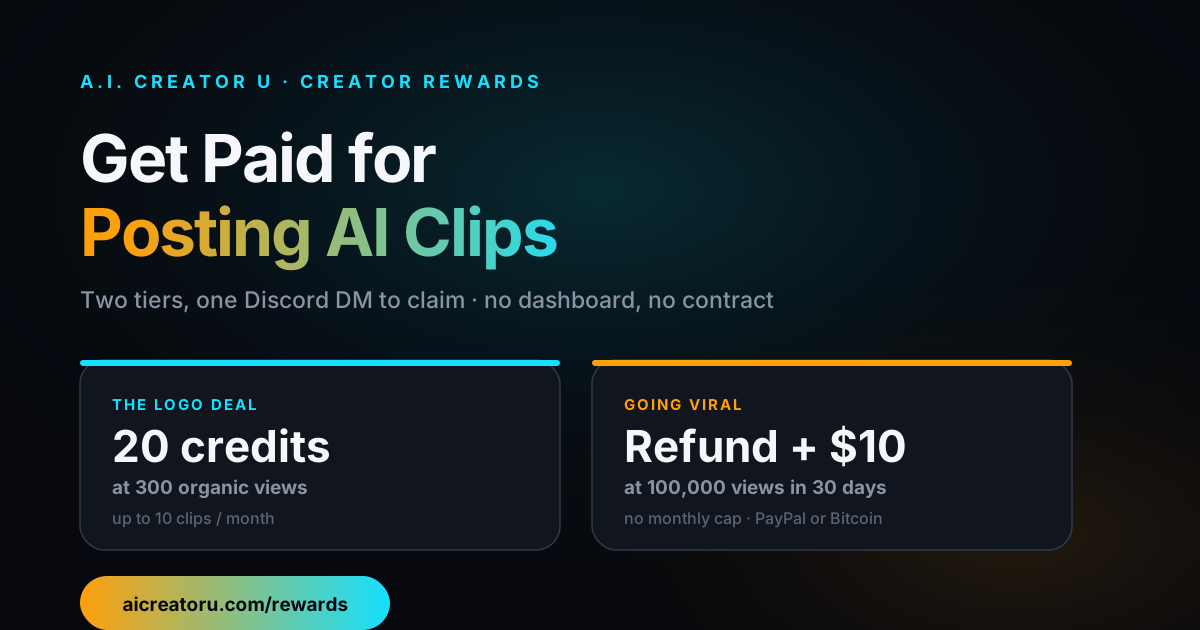
Quick answer: A.I. Creator U runs a two-tier rewards program at /rewards. Slap the official logo on a clip you made in the app, post it publicly, and hit 300 organic views, you get 20 credits back (up to 10 clips a month). Land 100,000 organic views on any clip within 30 days of posting it, logo or no logo, and you get that clip's full credit cost refunded plus $10 cash via PayPal or Bitcoin, with no monthly cap. Claims are manual: you DM a link and your account email in the official Discord, and the team verifies and pays out.
Most AI tools treat your output as the end of the transaction. You pay credits, you get a clip, goodbye. A.I. Creator U's rewards program treats a clip that performs as an asset worth paying you for again, because a video with the logo on it doing numbers is free marketing that beats anything a paid ad campaign buys.
Here's exactly how it works, what qualifies, what doesn't, and how to actually get paid instead of guessing.
Why does A.I. Creator U pay you to post?
Because organic reach on a real platform is worth more than what it costs the studio in credits. A TikTok that racks up 300 views with the logo visible has already done something a display ad can't: it proved someone watched it, didn't skip it, and probably shared it. Twenty credits is a rounding error compared to buyer acquisition cost anywhere else. And if a clip clears 100,000 views, that's not marginal reach, that's the kind of moment that gets a tool discovered by an entirely new audience. Paying the creator who made it, in cash, is the honest version of an affiliate program: you already did the hard part.
This isn't a fringe idea, either. The broader UGC and creator-ambassador market was reportedly worth over $7.6 billion in 2025, up from roughly $4.5 billion the year before, and industry trackers report that performance-tied payouts, where you get paid based on what a piece of content actually does rather than a flat fee for delivering it, made up more than half of brand-creator deals by 2026. A.I. Creator U's version is simpler than most: no contracts, no negotiated rate card, just two thresholds and a DM.
The two tiers, side by side
| The Logo Deal | Going Viral | |
|---|---|---|
| Threshold | 300 organic views | 100,000 organic views within 30 days of posting |
| Requirement | Official A.I. Creator U logo visible on screen throughout the clip | No logo requirement |
| Reward | 20 credits per qualifying clip | Full credit cost of that clip refunded, plus $10 (PayPal or Bitcoin) |
| Monthly cap | 10 rewarded clips per calendar month, per account | None |
| Stacks? | Yes, a logo'd clip that also hits 100k earns both | Yes |
| How you claim | Message a link + account email in the official Discord | Same |
The two tiers aren't mutually exclusive. Post one video with the logo on it, watch it clear 300 views for the 20 credits, and if it keeps climbing past 100,000 in that first month, you collect the second reward on the exact same clip. That's the best-case outcome, and it's built into the rules on purpose, not a loophole.
How to actually claim a reward (step-by-step)
1. Make a clip worth watching. Rewards are earned by real, organic view counts, not by gaming the system. The honest starting point is a clip good enough that people finish it and share it. If you're chasing volume (more shots at the 300-view tier) rather than one viral swing, a cheap, fast model works in your favor: Seedance 2 Mini is one of the few video models on the free tier, so you can post more attempts without burning through paid credits to test what lands.
2. Add the logo, if you're going for the Logo Deal. Two official marks are downloadable straight from the rewards page: the full mark-plus-wordmark version, better for a corner or an end card where it needs to read clearly, and a clean horizontal wordmark that works as a lower-third or a subtle top-corner tag. Both are transparent PNGs. Drop one in and don't touch it: no recoloring, stretching, or cropping it out at any point. It has to stay visible for the entire clip, not flash in for two seconds at the start. If you're only chasing the 100k tier, you can skip this step entirely; Going Viral has no logo requirement.
3. Post it somewhere real. TikTok, Reels, YouTube Shorts, wherever your actual audience already is. The rule that matters here: views have to be organic. No bots, no view-farming services, no paid boosting or promoted posts on either tier. A.I. Creator U reserves the right to check view authenticity and decline anything that looks manufactured, so don't bother trying to shortcut this.
4. Hit your number, then message the Discord. Once a clip clears 300 views (or 100,000, or both), drop a link to the post and the email address on your A.I. Creator U account into the official Discord. There's no automated dashboard tracking this in the app right now, so this DM is the entire claim process. The team verifies the view count against the platform and sends your credits or your cash.
What actually counts as "one clip"
This is the part people get wrong. The reward covers the credits spent on the single, finished clip you actually posted, not every draft along the way. If you generated a video three times to land the version you were happy with, only the credits for that one final, published clip count toward a refund; the two throwaway generations don't get reimbursed. Same logic applies across the board: test runs and failed generations aren't part of the deal.
It also has to be a clip made on A.I. Creator U and posted from a real, public account, and the reward is tied to the email address you used to generate it in the app. There's no way to claim a reward for a video you didn't actually make here, and the studio can ask for more proof or, in edge cases, withdraw either tier if something doesn't check out.
Is this worth doing for the free credits, or just for the cash?
Both, honestly, and they solve different problems. If you're already making content and posting it somewhere, adding the logo costs you nothing (a few seconds in whatever editor you're already using) for a real shot at 20 credits back, capped at 10 clips a month, which is 200 credits a month if you're consistent about it. That's not pocket change against a monthly credit budget.
The Going Viral tier is the one worth chasing if you're already thinking in terms of "will this clip actually pop." A hundred thousand organic views in 30 days is a real bar, most clips won't clear it, but if you're posting daily and iterating on what performs (which is the entire game with short-form anyway), the math changes: you're not spending extra effort to qualify, you're just getting paid on the upside when a piece you already made lands.
The honest caveat: this isn't a guaranteed income stream. It's an incentive to keep posting real content and to put the logo on stuff you're proud of. Treat it as free upside on work you were going to do anyway, not a business model.
A few things that will get a claim rejected
- Bought or bot views. The rules explicitly call out no bots, no paid promotion, no boosted posts on either tier. If your view count doesn't hold up to a look, the claim gets declined.
- An altered logo. Recolored, cropped, stretched, or watermarked over: any of that breaks the requirement that it stays official and unaltered.
- The logo dropping out mid-clip. "Visible throughout" means the whole runtime, not a flash at the intro.
- Claiming credits for retries. Only the final, published clip's credit cost is eligible, not every version you generated to get there.
- No account email match. If the email you post in Discord doesn't match the account that actually generated the clip, there's nothing to verify against.
FAQ
Do I need to be on a paid plan to earn rewards? The rewards program itself doesn't gate you by plan tier, it's about the clip you post and the views it earns. What you can generate in the first place depends on your account: new signups start with up to 16 free credits (a 6-credit welcome pack plus 10 more for finishing the onboarding tour, valid for 14 days), and a few video models, including Seedance 2 Mini, are available on the free tier specifically so you can start posting without buying credits first.
Can I use the reward credits to keep making more clips for the program? Yes. Credits paid out through the Logo Deal land in your account balance like any other credits, so you can spend them on your next generation, including your next attempt at another rewarded clip.
What if my clip hits 100,000 views on day 31 instead of day 30? The Going Viral tier is explicit about the window: 100,000 organic views within 30 days of the date you first posted the clip. If it's still climbing past that window, it doesn't qualify for that tier, so post early and don't sit on a finished clip before publishing it.
Do I have to pick one tier or the other? No. A single clip with the logo on it can qualify for the Logo Deal at 300 views and, if it keeps growing, the Going Viral tier at 100,000. You're not choosing a lane, you're just posting one good clip and seeing how far it goes.
Is there a limit on how many times I can hit the Going Viral tier? No monthly cap on that tier, unlike the Logo Deal's 10-clips-a-month limit. If you land multiple 100k-view clips in different 30-day windows, each one is a separate claim.
Where do I actually get the logo file, and does it matter which version I use? Both official marks live on the rewards page itself as direct-download transparent PNGs: a full mark-plus-wordmark version and a standalone horizontal wordmark. Either satisfies the Logo Deal requirement as long as it's unaltered and visible the whole clip; pick whichever fits your framing (the fuller mark for an end card, the wordmark for a subtle corner tag) rather than worrying it has to be one specific file.
Get your clip in front of people
The mechanics are simple on purpose: make something people actually want to watch, put the logo on it if you want the easier tier, post it somewhere real, and message the Discord when you hit a number. The Rewards page has both logo files ready to download and the exact rules laid out if you want to read them straight from the source before you start.
If you haven't made your first clip yet, Create Video is the fastest way in, and starting on a free-tier model like Seedance 2 Mini means you can post more shots at the 300-view tier without spending down paid credits first. Once you've got a channel going, pieces like Shorts Studio and building out an AI Creator Profile are the next logical moves for turning one-off clips into something that compounds, both for your audience and for how many rewarded clips you've got in flight at once. And if you're still figuring out what kind of channel to build in the first place, the Faceless Content Playbook is the place to start.