Quick answer: the cheapest AI video model right now
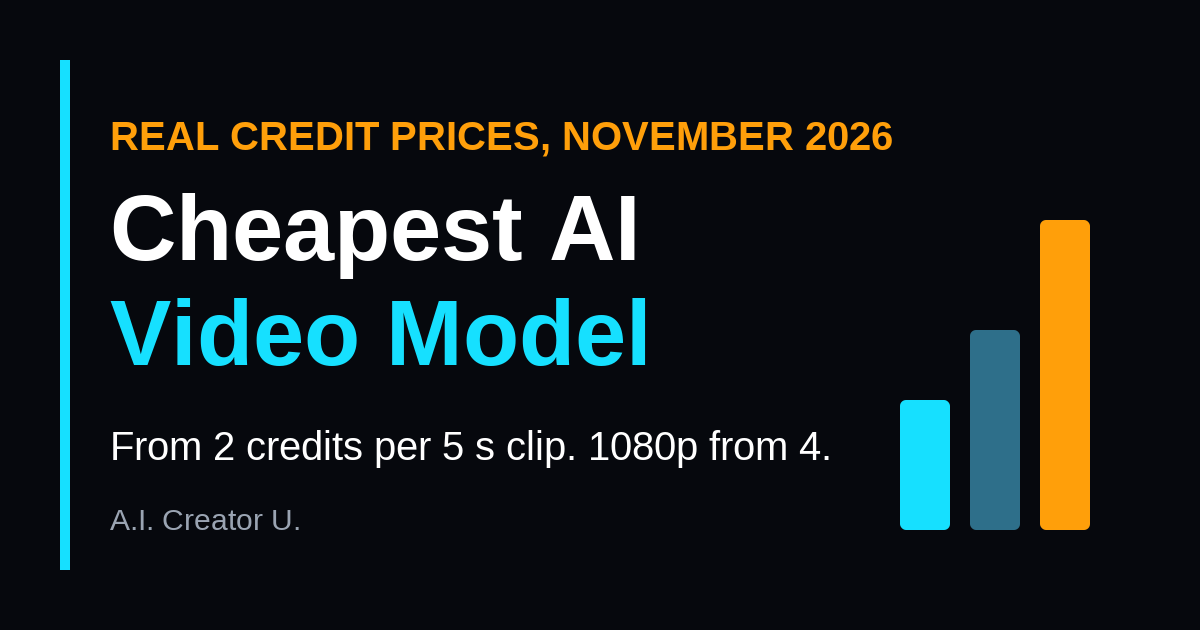
The cheapest AI video model on A.I. Creator U. as of November 2026 is Gemini Omni 1.2 Flash: 2 credits for a 5-second clip at 360p, and just 4 credits for 5 seconds at 1080p. Grok Imagine 1.5 ties it at 2 credits for 5 seconds at 480p, but it needs a starting image. Velocity is next at 3 credits.
- Cheapest with references (characters, products, sound): Velocity Surge, 5 credits for 5 seconds at 480p.
- Cheapest long clip (up to 30 seconds): Wan 3.0, 25 credits for 30 seconds at 480p.
- Cheapest raw API we found outside our app: Grok Imagine 1.5 Lite on xAI's own API, $0.02 per second at 480p.
Every number above comes from the live price function in our code on November 27, 2026, or from the vendor's own pricing page that day. No "starting at" fog.
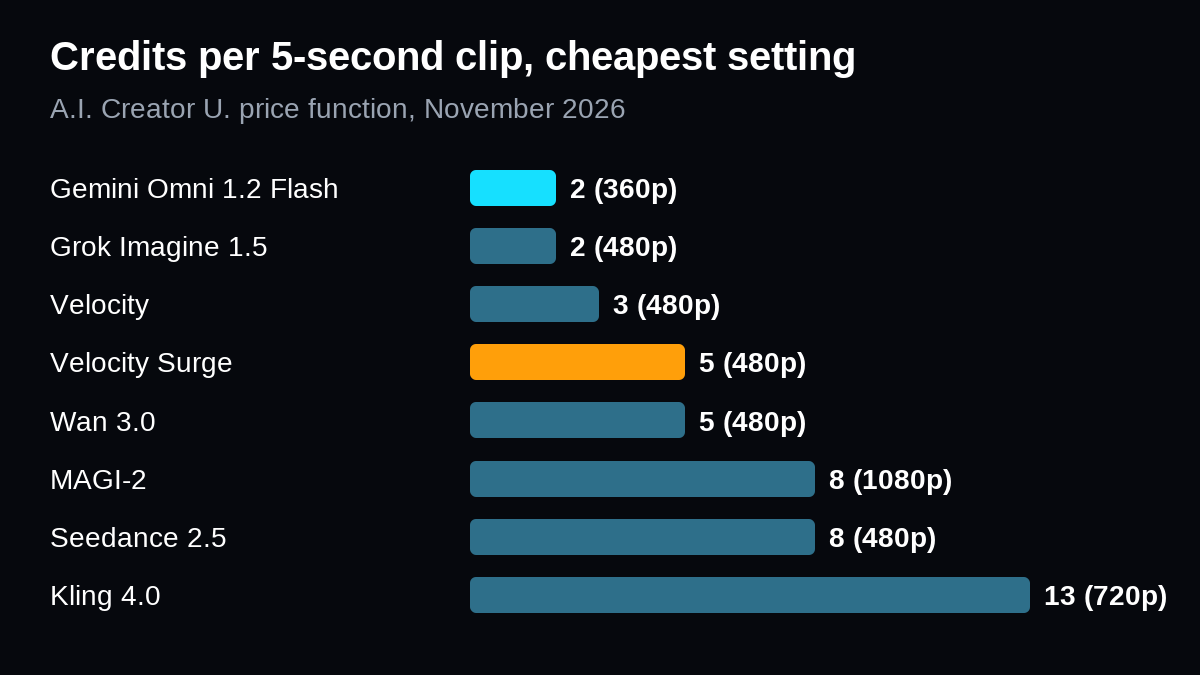 Figure 1: Credits for one 5-second clip at each model's lowest resolution on A.I. Creator U. Source: A.I. Creator U. price function, November 2026.
How we picked (and what "cheapest" actually means)
Price per second is the number every roundup leads with. It's also the number that lies the most, because three things move it:
- Resolution. The same model can cost 4x more at 1080p than at 480p. Seedance 2.5 goes from 8 credits to 33 credits for the same 5 seconds.
- Inputs. Some models charge extra for reference images or input video. Velocity Surge, for example, adds cost for every reference image past the fourth.
- Retries. A model that costs half as much but needs three takes is not cheaper. It's a slower way to spend more.
So we ranked on credits per 5-second clip at each model's cheapest setting, then checked what you get at 720p and 1080p, because nobody ships a client video at 360p.
What we tested hands-on: on November 25, 2026 we ran the same three prompts (a talking character, a skateboard action shot, an earbud product shot) through Seedance 2.5, Kling 4.0, Wan 3.0, Velocity Surge and MAGI-2, one take each, no cherry-picking. Those clips are embedded below with what each one cost. Gemini Omni 1.2 Flash, Grok Imagine 1.5 and Velocity were not part of that test, and we say so wherever they appear.
Cheapest AI video models compared (credits per clip, November 2026)
Prices are A.I. Creator U. credits from the server price function, text-to-video, no paid add-ons. The dollar value of a credit depends on your plan, so compare models against each other here, not against a dollar figure.
| Model | Cheapest 5 s clip | 5 s at 720p (768p*) | 5 s at 1080p | Max length | Best for |
|---|---|---|---|---|---|
| Gemini Omni 1.2 Flash | 2 credits (360p) | 4 credits | 4 credits | 15 s | Cheapest 1080p drafts and finals |
| Grok Imagine 1.5 | 2 credits (480p) | 4 credits | not offered | 15 s | Animating one still image |
| Velocity | 3 credits (480p) | 4 credits* | 7 credits | 15 s | Fast stylised text-to-video |
| Velocity Surge | 5 credits (480p) | 7 credits* | not offered | 15 s | Cheap shots with image, video and audio references |
| Wan 3.0 | 5 credits (480p) | 9 credits | 17 credits | 30 s | Long clips, native sound, many references |
| MAGI-2 | 8 credits (1080p only) | not offered | 8 credits | 30 s | Short multi-shot films at 1080p |
| Seedance 2.5 | 8 credits (480p) | 17 credits | 33 credits | 30 s | Premium quality when budget allows |
| Kling 4.0 | 13 credits (720p) | 13 credits | 20 credits | 30 s | Clean camera moves |
*Velocity and Velocity Surge render 768p for the middle tier, a touch above 720p.
The pattern is clear: four models sit at 5 credits or less per clip. Above that, you're paying for something specific (length, references, polish), and you should know what it is before you pay for it.
The 8 cheapest AI video models, ranked
1. Gemini Omni 1.2 Flash: cheapest or tied for cheapest at every resolution
- Cost: 2 credits for 5 s at 360p, 4 credits at 720p or 1080p. A 10-second 1080p clip is 8 credits.
- Standout: the 1080p price. It's half of MAGI-2 and a fifth of Kling 4.0 at the same resolution.
- What else it does: text to video, up to 6 reference images, first and last frames, and edits of a source video. Clips run 3 to 15 seconds.
- Limitation: it isn't in our same-prompt test yet, so we can't show you a side-by-side. It also isn't on the free tier: it needs a paid account.
If your only question is "what's the lowest number on the bill for a 1080p clip", this is the answer today. Run a few drafts before you commit it to a hero shot.
2. Grok Imagine 1.5: cheapest for animating a single image
- Cost: 2 credits for 5 s at 480p, 4 credits at 720p.
- Standout: it's available to accounts that haven't paid yet, which makes it the cheapest way to try AI video at all with your free signup credits.
- Limitation: it needs one reference image (no pure text-to-video), and it tops out at 720p. The picker describes it as best for subtle motion and quick animations.
- Not tested in our side-by-side.
Our walkthrough of the Grok video workflow covers the image-first approach.
3. Velocity: cheapest fast text-to-video with a 1080p option
- Cost: 3 credits for 5 s at 480p, 4 at 768p, 7 at 1080p.
- Standout: text to video, or animate a first frame with an optional last frame. The picker estimates 1 to 3 minutes per render.
- Limitation: no reference mode (that's what Surge is for). Not tested in our side-by-side.
4. Velocity Surge: the cheapest model that takes references
- Cost: 5 credits for 5 s at 480p, 7 credits at 768p, 9 credits for 10 s at 480p. Each reference image past the fourth adds a little.
- Standout: up to 9 reference images, 3 video clips and 3 audio clips in one prompt, so you can lock a face, a product or a style without paying flagship rates. Clips run 5 to 15 seconds, roughly 2 to 5 minutes per render.
- Tested: all three of our test clips cost 7 credits each at 768p, and all three came back with generated audio (dialogue and effects).
- Limitation: 768p is its ceiling. No 1080p. Like Velocity, Wan 3.0 and Gemini Omni 1.2 Flash, it becomes available once your account has bought credits or a plan.
This is the model we'd point most budget creators at first, because "cheap" stops being useful the moment your character's face changes between shots. Surge is the cheapest way we've found to keep it the same. See the Velocity Surge model page for specs and the live price table.
5. Wan 3.0: cheapest per second for long clips
- Cost: 5 credits for 5 s at 480p, 9 at 720p, 17 at 1080p. 25 credits for a full 30 seconds at 480p, 49 at 720p.
- Standout: up to 30-second output, native sound, start and end frames, and up to 20 image, video and audio references.
- Tested: each of our test clips cost 9 credits at 720p. On the talking-character prompt it gave one of the most expressive line deliveries of the lineup.
- Limitation: at 1080p it's no longer a budget pick (17 credits per 5 s, versus 4 for Gemini Omni 1.2 Flash).
6. MAGI-2: the cheapest 1080p model in our tested lineup
- Cost: 8 credits per 5 s, 1080p only. 48 credits for 30 seconds.
- Standout: it likes to cut like a film. One prompt can return several angles, sound included. Our 30-second desert-highway test ran 48 credits.
- Limitation: it simplifies "one continuous take" prompts, and it flattened our steep San Francisco hill into a level street. Full notes in our MAGI-2 guide.
7. Seedance 2.5: affordable at 480p, premium above it
- Cost: 8 credits for 5 s at 480p, 17 at 720p, 33 at 1080p.
- Standout: the most kinetic camera in our action test (low, heavy motion blur, lens flare).
- Limitation: on our skateboard prompt the red hoodie wasn't clearly red, and on the product prompt it shifted the matte black case to a warm bronze. It's the priciest model here at 720p and 1080p.
8. Kling 4.0: the clean-camera option
- Cost: 13 credits for 5 s at 720p, 20 at 1080p.
- Standout: the cleanest camera move in our action test, with the manhole cover actually in frame.
- Limitation: no 480p draft tier, so every test costs at least 13 credits. Our Kling 4.0 guide has copy-paste prompts for it.
Which cheap model is cheapest at 1080p?
Here's where most "cheapest" lists fall apart. Rank by 480p and you'll pick a model that gets expensive the moment you need a deliverable. At 1080p the order reshuffles:
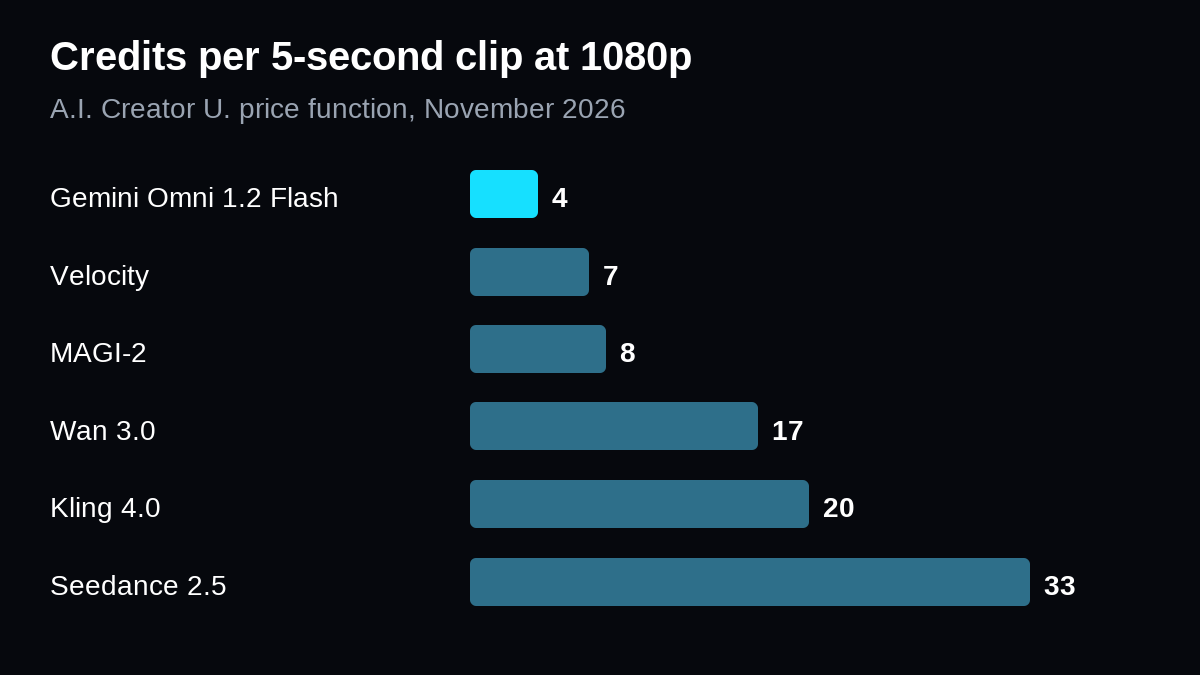 Figure 2: Credits for one 5-second 1080p clip on A.I. Creator U. Source: A.I. Creator U. price function, November 2026.
- Gemini Omni 1.2 Flash: 4 credits
- Velocity: 7 credits
- MAGI-2: 8 credits
- Wan 3.0: 17 credits
- Kling 4.0: 20 credits
- Seedance 2.5: 33 credits
That's an 8x spread for the same 5 seconds at the same resolution. Grok Imagine 1.5 and Velocity Surge don't offer 1080p at all.
Same prompt, four models: what the cheap ones actually look like
Prices mean nothing without the pictures. Here's our talking-character test: same prompt, 5 seconds, 720p, one take per model. Velocity Surge (bottom right) cost 7 credits; Seedance 2.5 (top left) cost 17.
All four spoke the line word for word (we checked by transcription). Seedance 2.5 framed a wider shot; the other three went to the close-up the prompt asked for. Wan 3.0 and Velocity Surge gave the most expressive delivery. In other words, the two cheapest models in this grid did not lose on the thing the prompt was about.
Here's the prompt, if you want to run it yourself:
Medium close-up of a weathered fisherwoman in her sixties wearing a yellow raincoat, standing on a wooden dock in steady rain at dusk. She looks straight into the lens and says in a calm, gravelly voice: "The sea doesn't care how ready you are." Rain streaks past her face, gulls cry in the distance, waves knock against the pilings. Gentle handheld camera drift toward her. Warm lantern light on one side of her face, cold blue dusk on the other.
| Model | Credits for this clip (5 s, 720p) |
|---|---|
| Velocity Surge | 7 |
| MAGI-2 (1080p) | 8 |
| Wan 3.0 | 9 |
| Kling 4.0 | 13 |
| Seedance 2.5 | 17 |
And the Velocity Surge clip on its own, with sound:
The full five-model breakdown, with all three prompts, is in MAGI-2 vs Seedance 2.5 vs Kling 4.0.
Want to see what your prompt costs? Run it on Velocity Surge, then switch the picker to Wan 3.0 or Kling 4.0 and run it again. Same login, same prompt, and the credit cost shows before you hit generate.
Cheapest AI video model API prices (if you code)
If you're building an app and calling models directly, here's what the vendors' own pricing pages listed on November 27, 2026. These are dollars per second of output, before any reference or input-video charges.
| Model and route | 480p | 720p or 768p | 1080p | Source |
|---|---|---|---|---|
| Grok Imagine 1.5 Lite (xAI API) | $0.02/s | $0.03/s | $0.14/s | xAI models page |
| MiniMax H3 Max (fal) | $0.05/s | $0.08/s | $0.16/s | fal model page |
| Gemini Omni Flash 1.2 (Runway API) | $0.02/s at 360p | $0.07/s | $0.10/s | Runway API pricing |
| Wan 3 (Runway API) | $0.05/s | $0.10/s | $0.20/s | Runway API pricing |
| Gen-4 Turbo (Runway API) | $0.05/s | Runway API pricing |
Where they beat us: Grok Imagine 1.5 Lite at $0.02 per second is a model we don't carry, and if you want raw volume through code, that's a very low number. fal's MiniMax H3 Max (the engine behind Velocity Surge) dropped its launch promo on November 16, 2026, so roundups written during the promo quote lower numbers than you'll pay now.
Where an all-in-one app wins: you don't need an API key per vendor, you can compare models on the same prompt without writing code, and failed renders don't become your engineering problem. That's our opinion, and the honest way to test it is to run the same prompt both ways and compare the bill.
What you give up at the lowest price
Cheap models are cheap for reasons. Know them before you build a project on one.
- Resolution. 360p and 480p are for checking motion, not faces. At 480p a face in a medium shot is a few pixels, and the model has to guess the rest. Finish at 720p or above.
- References. Grok Imagine 1.5 takes one image. Velocity takes a first and last frame. If you need the same character across ten shots, Velocity Surge or Wan 3.0 is the cheaper route in the end, because a cheap model that changes the face is a re-shoot.
- Length. Velocity, Surge, Grok and Gemini Omni 1.2 Flash stop at 15 seconds. Wan 3.0, MAGI-2, Kling 4.0 and Seedance 2.5 go to 30.
- Retries. Our test was one take per model on purpose. In real work you'll throw some takes away. Budget for it.
How to make AI video for less: a 3-step workflow
This is how we keep a project's bill down without making it look cheap.
- Draft at the floor. Run every shot as a 5-second test at the lowest resolution first. Most bad takes are visible in the first second, and a 2 to 5 credit test beats a 33 credit surprise.
- Pick the model for the shot. A talking close-up, an action shot and a product shot each have a different cheapest-good-enough model. Comparing models on the exact shot you need beats any leaderboard, ours included.
- Finish only the keepers. Re-run the winning prompt at 720p or 1080p. With Gemini Omni 1.2 Flash, a 5-second 1080p finish costs the same 4 credits as 720p, which makes skipping 720p an easy call.
Want the free route first? Our best free AI video generators roundup covers where free credits go furthest, and the AI video generation complete guide covers the fundamentals.
Bottom line: the cheapest AI video model depends on the resolution you ship
For the lowest bill at any resolution, Gemini Omni 1.2 Flash wins today, at 4 credits for a 5-second 1080p clip. For animating one image on a free account, Grok Imagine 1.5. For cheap shots that keep your character or product consistent, Velocity Surge at 5 to 7 credits. For long clips, Wan 3.0.
The cheapest model is the one that gets the shot in one take. The only way to know is to run your prompt on two or three of them and look.
Try Velocity Surge on your own prompt, then switch models and compare. You get free credits when you sign up: test prompts on Grok Imagine 1.5 while you're on the free tier, then move to Velocity Surge, Gemini Omni 1.2 Flash or Wan 3.0 once your account has bought credits or a plan.