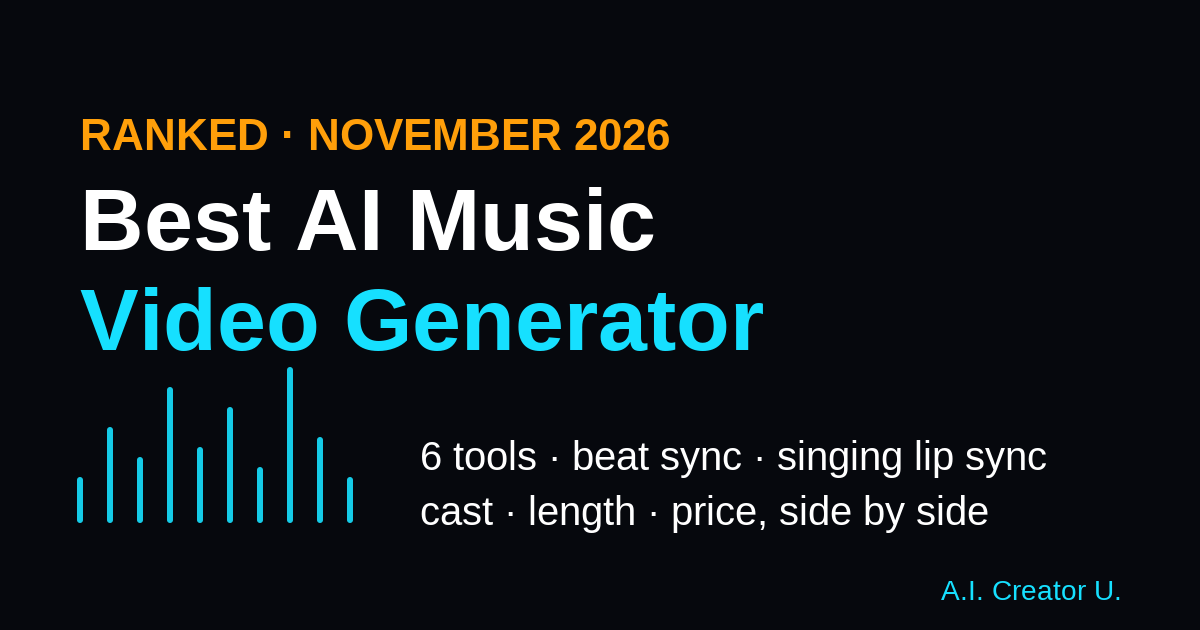
Plenty of "best AI music video generator" lists rank tools from their feature pages and call it testing. This one is different in one honest way: we make one of the tools on it, we've spent real credits making music videos, and we'll tell you exactly where the others beat us.
Quick answer: the best AI music video generator for each job
The best AI music video generator depends on the video you want. For a story or performance video where the singer actually sings your song, pick a tool that hears the track first: Ryo on A.I. Creator U. or HeyGen's music video generator. For abstract, audio-reactive visuals, Neural Frames. For fast stylized beat-sync clips, Kaiber.
- Ryo maps beats, sections and every word before it plans a single shot, and you approve the price before filming.
- HeyGen offers phoneme-level singing lip sync and 4K export, with a free plan capped at 1-minute videos.
- Kaiber's Beat Sync starts on its $29/month Creator plan (as of November 2026).
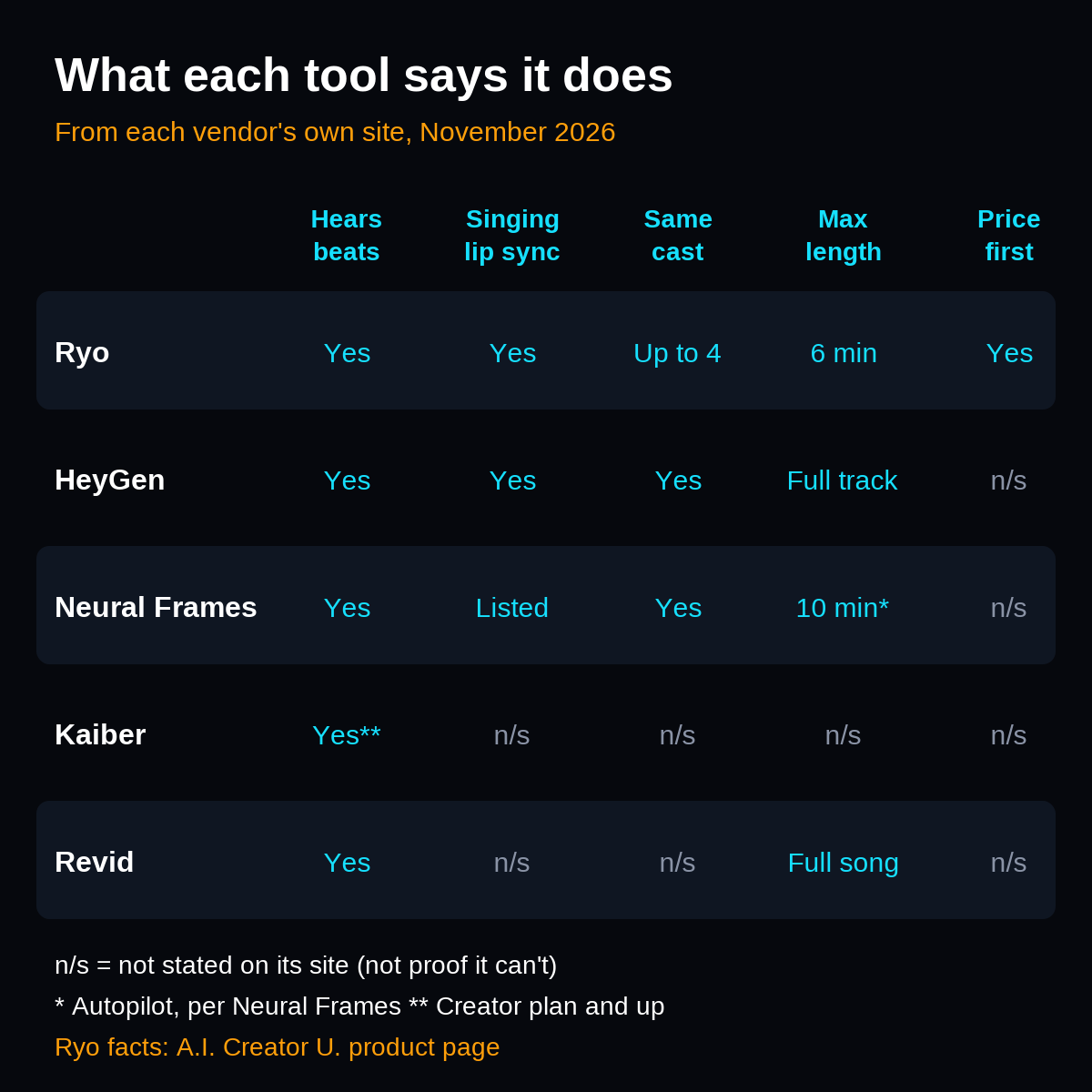 Figure 1: What each tool states on its own site. "n/s" means the site doesn't say, not that the tool can't. Source: vendor sites (Kaiber, Neural Frames, HeyGen, Revid) and the A.I. Creator U. product page, November 2026.
How we picked the best AI music video makers
A music video is not a pile of pretty clips. It's a song with pictures that obey it. So we ranked on five things that decide whether you get a music video or a slideshow with a soundtrack:
- Does it hear the song? Beat and section timing at minimum. Word timing if anyone sings on screen.
- Singing lip sync, not speech lip sync. Singing holds vowels, slides pitch and closes the lips on b, m and p in ways a talking-head model never practised.
- The same cast in every shot. If your singer's face changes between the verse and the chorus, the video falls apart.
- Full-song length. A 15-second loop is a visualizer. A music video runs the whole track, or at least a full section.
- You see the price before you pay. AI video eats credits on throwaway takes. A tool that quotes first protects your budget.
What we tested and what we didn't. Our studio has made real music videos with A.I. Creator U. models, so the cost numbers and examples below are first-hand. We did not run paid tests on every competitor. Their features and prices come from their own websites, read on November 27, 2026, and linked so you can check them. Where a site doesn't state something, we say "not stated" instead of guessing. Kaiber and Neural Frames were running Black Friday offers the day we checked, so prices may jump back soon.
And the obvious disclosure: Ryo is ours. Weigh our ranking with that in mind. We tried to make every claim checkable.
Best AI music video generator comparison table (November 2026)
| Tool | Best for | Hears the song | Singing lip sync | Length | Starting price (as of Nov 2026) |
|---|---|---|---|---|---|
| Ryo (A.I. Creator U.) | Story and performance videos from your song | Beats, sections, word timing | Yes, you pick who sings each line | Up to 6 minutes | Free song breakdown; filming quoted in credits before you approve |
| HeyGen | Avatar performers, 4K, multilingual releases | Beats and sections | Yes, phoneme level | Full track; Free plan up to 1 min | Free plan; Creator $29/mo or $24/mo yearly |
| Neural Frames | Audio-reactive, stylized visuals with control | Beat sync, audio engine | Listed as a feature | Autopilot "10-Minute Music Videos" | $39/mo or $26/mo yearly |
| Kaiber | Quick stylized beat-synced variations | Auto-sync to music (Creator and up) | Not stated | Not stated | $5 for 5 days; Starter $10/mo (no Beat Sync) |
| Revid | Short-form social clips with lyric captions | Beats or lyrics | Not stated | Full song or excerpt | Growth $39/mo (shown down from $99) |
| Freebeat | One-upload dance and social videos (per roundups) | Beat-aware, per Unite.AI | Couldn't verify | Couldn't verify | Couldn't load its pricing page |
Sources: Kaiber pricing, Neural Frames pricing, HeyGen pricing and music video tool, Revid pricing and music video tool, all read November 27, 2026.
1. Ryo on A.I. Creator U.: best for story and performance music videos
Best for: artists who want a real music video (a cast, a story, a singer who sings their lyrics) without learning five tools and a timeline editor.
Ryo is the AI music video director inside A.I. Creator U. You upload a song you own or have rights to (MP3, WAV, M4A, FLAC, OGG or MP4, up to 6 minutes), and Sync Engine maps it first: the beats, the sections and the timing of every word. Then you plan the story with Ryo in chat, approve the cast, see the quote, and filming runs. You review every shot and can ask Ryo to reshoot the one you don't love. Then the edit cuts every shot to the beat, and you download the MP4 plus every raw take.
Standout features
- Every chorus opens on the singer. It's the oldest rule in music video directing, built in.
- Lyrics become pictures. Sing about dominoes falling, watch dominoes fall.
- Duets work. Sync Engine hears both voices and you pick who sings each line. Up to 4 performers, and instrumentals work too.
- Looks matched to genre: hyperreal, animated, 3D or a mix.
- Price first. Song analysis, lyric timing, the story chat and each character's first drawing are free. Shot planning costs a few credits. Filming is quoted and approved before anything is filmed, and reshoots are quoted first too.
Figure 2: A full-song music video (2:41) our studio made from scratch with A.I. Creator U. models: a Midjourney V8 look, GPT Image 2.5 cast frames, Velocity and Velocity Surge lip sync. 244 credits. Watch the full video (MP4, 2:41). Source: A.I. Creator U. studio, November 2026.
A note on that example, because it matters: our studio made it by hand, shot by shot, with the same models Ryo runs. It wasn't made inside the Ryo app. It shows what the engines can do. Ryo's job is to run those steps for you.
What it costs. Credits, quoted before filming. The app's own rough guide at 720p is about 130 credits for a 30-second video, about 190 for 60 seconds and about 450 for a 3-minute song. That guide isn't a quote; you see the exact price before anything is filmed. A real example printed on the Ryo page: a full 2:36 duet used 307 credits.
Limitations (honest ones)
- Songs up to 6 minutes. Neural Frames advertises 10-minute Autopilot videos.
- You can pick 16:9, 9:16 or 1:1, but the vertical and square versions get the automatic cut rather than the directed 16:9 edit.
- A full song usually takes a couple of hours. You can close the tab while it works, but it's not a 5-minute render.
- No 4K claim here. HeyGen advertises 4K export.
2. HeyGen: best for avatar performers, 4K and multilingual releases
Best for: artists and labels who want one consistent AI performer, 4K output, or the same performance dubbed into other languages.
HeyGen's AI music video generator page says it paces scenes to the song's beats and sections, matches mouth movement to vocals "at the phoneme level", keeps one performer's face and outfit across every scene, and renders the full track in one pass before upscaling to 4K. It also offers dubbing into 175+ languages, a feature none of the other tools list on the pages we read.
Standout feature: multilingual lip sync. If you release in several markets, this is a real edge.
Limitation: HeyGen is an avatar and video platform first. Its pricing page doesn't mention music videos or singing at all, so check which plan the music tool needs before you subscribe.
Pricing (as of November 2026): Free plan with 3 watermarked videos a month, up to 1 minute each. Creator is $29/month ($24/month billed yearly) with 30-minute max length and 600 credits. Pro is $49/month.
Where it beats Ryo: 4K export and multilingual dubbing. Where Ryo pulls ahead: word-level song mapping before planning, choosing who sings each line in a duet, and a quote before filming.
3. Neural Frames: best for audio-reactive visuals and control
Best for: electronic artists, producers and anyone who wants visuals that pulse with the kick drum and morph with the synths.
Neural Frames calls itself the platform "built for musicians who want creative control." Its homepage lists audio-reactive video, beat sync, lip sync, lyric videos, multi-character consistency, a full timeline editor and Autopilot "10-Minute Music Videos." Its audio engine analyzes rhythm, energy and structure, and you set the beat-sync intensity yourself.
Standout feature: control. If you want to decide how hard the bass hits the visuals, this is the tool built for that.
Limitation: its strength is audio-reactive and stylized work. If you want a grounded narrative performance with a story, budget time for the timeline. Its pricing page also doesn't say which plans include lip sync, so check before buying for a singing video.
Pricing (as of November 2026): Neural Knight $39/month ($26/month yearly, 2,400 credits), Neural Ninja $99/month ($66 yearly, 7,200 credits), Neural Nirvana $299/month ($199 yearly). Its own page marks the cheapest plan "Not recommended for Autopilot." The site was running a 50% off yearly Black Friday offer when we checked. No free plan is listed on the pricing page.
4. Kaiber: best for fast, stylized beat-synced clips
Best for: artists who want lots of stylized variations for social, fast.
Kaiber's pricing page lays out its Beat Sync features plainly: auto-sync to music, lyric detection and text overlays, no-prompt image to video, auto-clipped videos, and batch creation (2 videos at once on Creator, 10 on Pro).
Standout feature: batch variations. Throw one track at it and get options to test.
Limitation: Beat Sync isn't on the cheapest plan. Starter ($10/month) says "No access to Beat Sync" on Kaiber's own page. The site doesn't state singing lip sync or a max video length, so if you need a singer on screen, test before you commit.
Pricing (as of November 2026): $5 for a 5-day trial (converts to Creator). Starter $10/month (500 credits), Creator $29/month (1,500 credits, Beat Sync), Pro $99/month (5,000 credits). Kaiber was offering 30% off annual upgrades for Black Friday.
5. Revid: best for short-form social clips with lyric captions
Best for: TikTok, Reels and Shorts creators promoting a track.
Revid's music video tool takes an MP3, WAV or music link, and lets you sync scenes to the lyrics (with lyric captions) or to the beats, for the full song or an excerpt. You choose the media: AI video (marked as a Pro plan feature on the page), animated AI images, stock video or your own media, plus 62 style presets and optional sound-wave overlays.
Standout feature: flexibility on cost. Animated still images and stock footage are cheaper routes than full AI video for every shot.
Limitation: the pages we read don't mention lip sync, so it's not the pick for a performer singing your lyrics.
Pricing (as of November 2026): Growth $39/month (shown reduced from $99, 2,000 credits), Elite $89/month (5,000 credits), Ultra from $199/month, per Revid's pricing.
6. Freebeat: the roundup favourite we couldn't verify today
Freebeat sits at or near the top of several roundups. Unite.AI's November 2026 list reports that it turns song links or files into beat-aware dance, lyric and social videos, and lists its paid plans as promotional prices.
We tried to read Freebeat's own pricing page for this post, and its bot check blocked us. So we're not quoting a price or a feature list we couldn't confirm. If it's on your shortlist, open its pricing page yourself and look at what a regeneration costs, because that's where AI music video budgets quietly go.
Which AI music video generator should you pick?
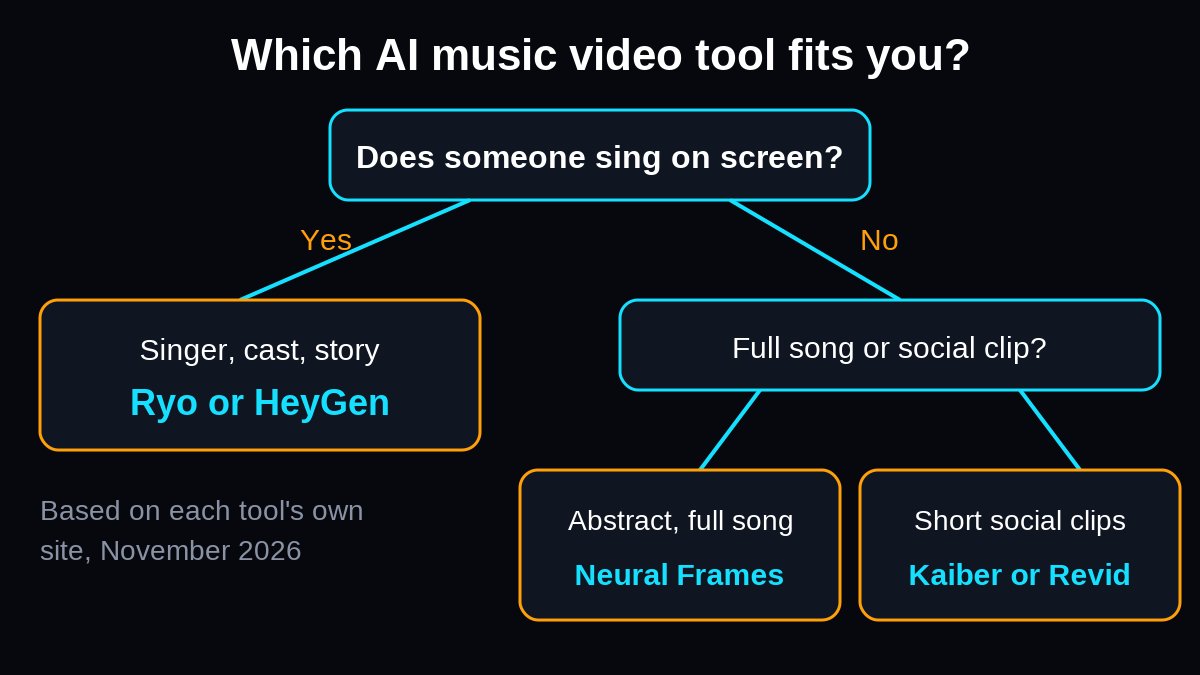 Figure 3: A quick decision tree for picking a tool, built from the comparison above. Source: each tool's own site, November 2026.
Skip the leaderboard. Answer three questions:
Does a person sing on screen? Then you need singing lip sync and the same face in every shot. That's Ryo or HeyGen. Neural Frames lists lip sync too; check the plan.
Is it abstract or a story? Abstract, audio-reactive visuals: Neural Frames or Kaiber. A story with a cast: Ryo or HeyGen.
Where will it live? A full YouTube video wants full-song length and a real edit. A TikTok teaser can be a Revid or Kaiber clip.
One opinion we'll defend: all-in-one studios beat single-model apps for most creators, because the right model changes shot by shot. A wide dance shot and a close-up lip-sync shot want different engines. That's our position, not a law of physics, and you can test it yourself: run the same shot in two tools and compare.
Best AI music video generator with lip sync: what actually matters
Singing lip sync is where most tools quietly fall over. Speech models are trained on people talking. Singers hold a vowel for two beats, slide between notes and snap their lips shut on b, m and p. Miss those closures and the whole shot reads as dubbed.
Figure 4: A 35.5-second handheld rap performance video our studio built from six phone photos of a real artist, for 149 credits. Watch the full video (MP4, 0:35). Source: A.I. Creator U. studio, November 2026.
That video taught us the hard part isn't the face. It's the mouth closures on fast rap delivery. In Ryo, singing shots run on Velocity Surge, a lip-sync model, while shots without singing run on Velocity. If you want the deeper dive on lip sync for talking content, our Kling AI lip sync guide covers the speech side.
Three rules that save credits, whichever tool you use:
- Measure the voice before you cast the singer. We once cast a performer before checking the vocal, picked the wrong voice type, and lost about 177 credits of lip-sync takes before anyone noticed. Now measuring the voice is step one.
- Keep the face under about 40% of the runtime. Wall-to-wall lip sync is tiring to watch. Cut away to people, places and light.
- Test short before you spend. Run a 5-second test of each shot first. Most bad takes are obvious in the first second.
How to make your first AI music video with the top pick
Here's the Ryo workflow, start to finish. Your part is a few short steps.
- Upload your song (up to 6 minutes, or just one section for a teaser). Use a song you own or have permission to use. Suno and Udio songs are welcome when you have the rights.
- Let Sync Engine map it. Beats, sections and word timing. Free.
- Plan the story with Ryo in chat. Try this as your opening message: "Grounded performance video. The singer in a laundromat at night under green fluorescent light, cutting to the city outside on the hooks. No props acting out the lyrics."
- Approve the cast. A photo is optional; you can describe a character instead. Each character's first drawing is free. Only use a real person's likeness with their permission.
- See the quote and approve it. Nothing is filmed before you say yes.
- Review every shot. Ask Ryo to reshoot anything off. Reshoots are quoted first.
- Download the beat-cut MP4 plus every raw take, so you can cut your own Shorts.
Turn your track into a music video: upload your song to Ryo and start with the free song breakdown. You get free credits when you sign up, and you see the filming price before you spend any.
Want the bigger picture first? Our AI music video generator guide explains how song-first tools differ from prompting clips yourself, and how to keep AI characters consistent covers the cast problem in depth.
Is there a best AI music video generator free option?
Free plans exist, with limits. HeyGen's Free plan gives 3 watermarked videos a month up to 1 minute each. Kaiber has a $5 five-day trial rather than a free plan. Neural Frames lists no free plan on its pricing page. On A.I. Creator U., the song analysis, lyric timing, story chat and first character drawings are free, and new accounts get free credits when they sign up; filming costs credits.
The honest answer: a free AI music video for a full song, with a singer and no watermark, is rare. A free test of the planning step is common. Use free tiers to judge whether the tool hears your song before you pay to film it.
What about the best AI music video app?
The five tools we could check all run in a web browser, which is where you want a song-length project anyway: uploads, reviews and downloads of a multi-minute MP4 are easier on a laptop. If you mostly make teasers on a phone, a short-form tool like Revid or Kaiber fits that habit. For full songs, use the browser and save the phone for posting.
If you're also making the song with AI, our guide to AI music for videos covers that half, and the complete guide to AI video generation explains the models underneath all of these tools.
Bottom line: the best AI music video generator hears your song first
The roundups disagree about who's number one (Unite.AI leads with Neural Frames, WPS picks Freebeat), and that's a clue. There's no single best AI music video generator, only the best one for your video:
- A singer, a cast and a story, with the price shown first: Ryo.
- An avatar performer in 4K, or a release in many languages: HeyGen.
- Abstract, audio-reactive visuals with fine control: Neural Frames.
- Fast stylized variations for social: Kaiber.
- Lyric-caption clips for TikTok and Reels: Revid.
Your first AI music video will take three tries. Your fifth will take one. The fastest way to the fifth is to start with a tool that listens before it films.
Ready to see your song? Make your music video with Ryo. The song breakdown is free, and you approve the quote before a single shot is filmed.