Quick answer: An AI music video generator turns a song into a finished music video: it listens to the track, plans shots that match the beat and the lyrics, films a performer singing in sync, and cuts it all on the beat. The good ones hear the song before they film. Ryo, the AI music video director inside A.I. Creator U., maps every beat and word for free, then shows you a quote before anything is filmed. A 60 second video runs about 190 credits on its rough guide.
Your first AI music video will take three tries. Your fifth will take one. This guide is about getting you to the fifth faster, whether you build it by hand or let an AI music video maker do the heavy lifting.
What a real AI music video looks like
Here is a full-song music video our studio made with the same models Ryo uses: a Midjourney V8 look, a consistent cast, and lip-synced singing, cut on the beat from start to finish.
Figure 1: A 2:41 full-song music video made from scratch with A.I. Creator U. models. It used 244 credits. Source: A.I. Creator U. studio, November 2026.
Watch the full video (MP4, 2:41)
It was made by hand, shot by shot, by our studio. Ryo runs those same steps for you. That's the honest pitch: this is what the engines can do, and the app does the directing.
What is an AI music video generator?
An AI music video generator is software that takes your audio and gives you back a video built for it. That sounds simple. It covers very different tools.
Some are visualizers: abstract shapes and colors that pulse with the audio. Some are template editors: stock footage or lyric text dropped onto your track. And some are AI music video creators that actually film a performance: a character who sings your words, in scenes that follow your song's story.
This guide is about the third kind, because it's the one people mean when they say "a real music video." If you want an abstract loop, a visualizer is cheaper and faster. Pick the tool for the job, not the buzzword.
What it should hear in your song
A useful AI generated music video starts with listening, not prompting. Before a single shot exists, the tool should know:
- The beats, so cuts land on them instead of near them
- The sections (verse, chorus, bridge), so the energy of the edit follows the song
- Every word and when it's sung, so lip sync and lyric text hit the syllable
- Who is singing, if it's a duet
In Ryo, that job belongs to Sync Engine. It maps beats, sections and word-level lyric timing the moment you upload, and that breakdown is free.
Two ways to make a music video with AI
You can get a music video out of AI in two ways. Both work. They cost different things.
| Do it yourself with a video model | Use an AI music video maker (like Ryo) | |
|---|---|---|
| How it works | Prompt each clip in a video model, then edit in CapCut or Premiere | Upload the song, plan with the director, approve, get the cut |
| Beat sync | You place every cut by hand | Every cut lands on the beat automatically |
| Lip sync | You line up each take with the vocal | Lip-sync shots are timed to the word map |
| Consistent cast | You manage reference images per shot | The approved cast is carried into every shot |
| Your time for a full song | Days, if you're quick | Usually a couple of hours of mostly waiting |
| Control | Total | High: you approve the story, cast and quote, and review every shot |
| Best for | Editors who want every frame their way | Musicians who want the video, not the project |
The DIY route is real and we do it ourselves (it's how the video above was made). It's also how you learn that a three minute song needs dozens of clips, each one tested, timed and trimmed. If that sounds fun, start with our complete guide to AI video generation and our AI video prompts that actually work.
If you'd rather spend those days on the next song, a director app is the better trade.
How an AI music video generator works, step by step
Here is the whole pipeline as Ryo runs it. The same eight steps apply if you build it by hand; you just do all of them yourself.
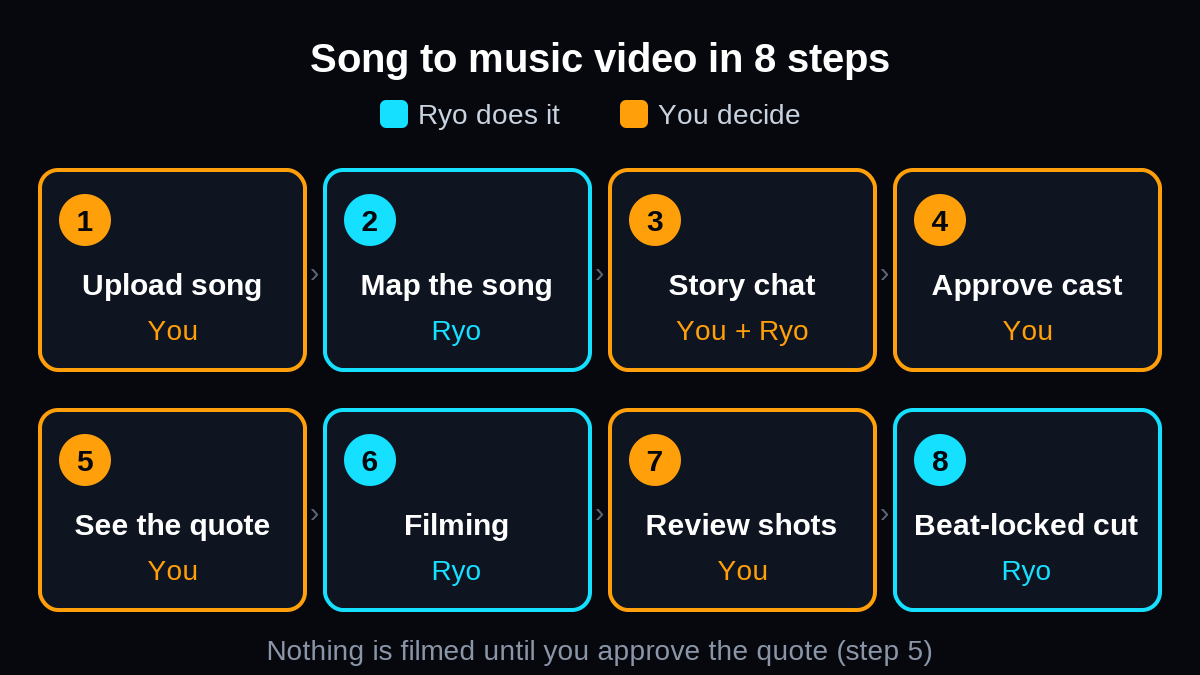 Figure 2: The eight steps from song to finished cut, and who does each one in Ryo. Source: A.I. Creator U. music video flow, November 2026.
- Upload the song. MP3, WAV, M4A, FLAC, OGG or MP4, up to 6 minutes. Do the whole song or one section.
- Sync Engine maps it. Beats, sections and the timing of every word. Free.
- Plan the story with Ryo. You chat about the idea. Ryo turns lyrics into pictures, so if you sing about dominoes falling, you can watch dominoes fall.
- Approve the cast. Up to 4 performers. A photo is optional; you can describe a character instead. Each character's first drawing is free.
- See the quote. Shot planning uses a few credits, shown before you continue. Then you see the filming and editing price. Nothing is filmed until you approve it.
- Filming runs. You can close the tab while it works.
- Review every shot. Don't love one? Ask Ryo to reshoot it. Reshoots use credits and the price is shown first.
- Get the cut. The edit lands every cut on the beat. You download the finished MP4 plus every raw take.
Step 5 is the one most tools skip. Seeing the price before the spend is the difference between a budget and a surprise.
Beat sync, lip sync and a consistent cast: what separates a good AI music video maker
Most AI music video apps can make something move to your song. Three things decide whether it looks like a music video or a slideshow with ambitions.
Beat sync
A cut that lands a few frames late feels wrong even when viewers can't say why. A generator that has mapped the beats can put every cut on one. Ryo also follows a rule music video directors swear by: every chorus opens on the singer.
Lip sync on singing, not speech
Singing is harder than talking. Vowels are held, words stretch over notes, and the mouth has to close on b, m and p sounds or the illusion breaks. Ryo films its lip-sync shots with Velocity Surge and its other shots with Velocity, both of which you can also pick yourself in Create Video. For a deeper look at how lip sync models behave, see our Kling AI lip sync guide.
Figure 3: A 35.5 second handheld rap performance video built from six photos of a real artist. 149 credits. Source: A.I. Creator U. studio, November 2026.
A working artist sent us six phone photos, and we built that video from them for 149 credits. The hard part was not the face. It was the mouth closures on b, m and p. Watch it (MP4, 0:35).
One opinion we'll defend: keep the singer's face on screen for under about 40% of the runtime. Wall-to-wall lip sync is tiring to watch. Cut away to people, places and light, and the close-ups hit harder when they come back.
A consistent cast
The fastest way to make a video look AI-made is a lead whose face changes every shot. Ryo carries your approved cast into every shot, even through up to 4 outfit changes. If you're building by hand, our guide to keeping AI characters consistent every single time covers the reference workflow.
If you're weighing tools side by side, our ranked list of the best AI music video generators compares Ryo, HeyGen, Neural Frames, Kaiber and Revid on lip sync, length and real prices.
Pick a look that matches your genre
A trap video should look like trap. A country video should look like country. Ryo offers hyperreal, animated, 3D or a mix of looks, and matches them to the genre you're working in.
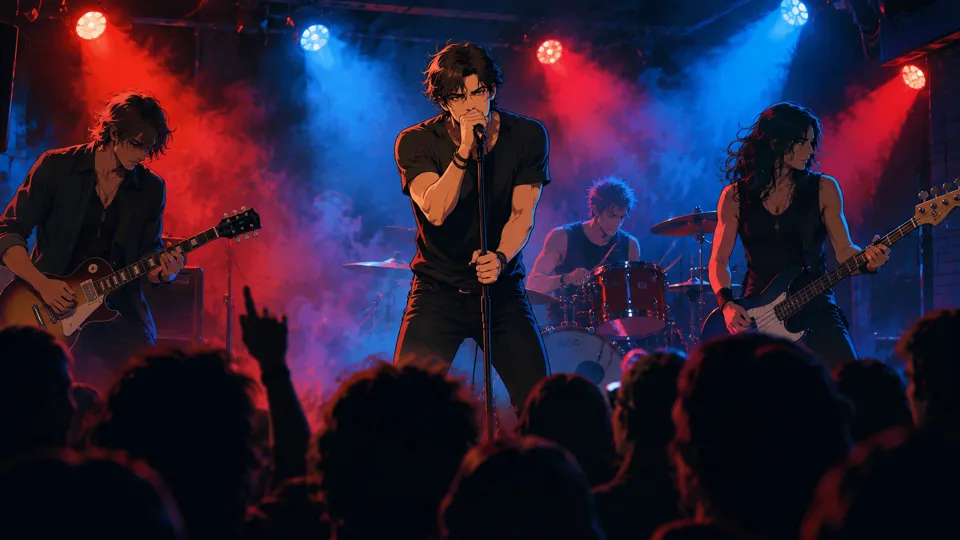 Figure 4: One of Ryo's looks, animated, on a club performance scene. Source: A.I. Creator U. /music-videos, November 2026.
You also choose the moves: still, attitude or full dance shots. And lyric text can slam in on the syllable, or you can leave the screen clean. (Your call. Some songs want the words, some want the faces.)
How much does an AI music video cost?
There are two answers: what traditional crews charge, and what the AI route actually burns. Ryo's own landing page frames the first as "a director, a crew and an editor cost thousands." The second we can show with real numbers.
Ryo's rough guide at standard 720p is 60 credits plus 2.05 credits per second, rounded up. It is a guide, not a quote: you always see the exact price before filming.
| Song length | Rough guide (credits) |
|---|---|
| 30 seconds | about 130 |
| 60 seconds | about 190 |
| 3 minutes | about 450 |
And here is what real videos cost, made with A.I. Creator U. models:
| Video | Length | Credits |
|---|---|---|
| Full 2:36 duet (quoted on Ryo's landing page) | 2:36 | 307 |
| Rap performance from 6 photos | 35.5 s | 149 |
| Full-song showpiece (Figure 1) | 2:41 | 244 |
| Trippy dance video, beat-locked | first 2:00 | 346 |
The free part is generous: song analysis, lyric timing, the story chat and each character's first drawing cost nothing. You pay once you've seen the plan and the price.
Our most expensive lesson didn't show up in that table. We once cast a performer before measuring the vocal, picked the wrong voice type, and lost about 177 credits of lip-sync takes before anyone noticed. Measure the voice first. It's free.
Ready to hear your own song mapped? Start a free song breakdown with Ryo and see the quote before you spend a credit.
Is there a free AI music video generator?
Partly, and you should be suspicious of anything that says "completely free" for a full performance video. Filming a minute of singing video costs real compute, and somebody pays for it. Free tiers usually pay for it with watermarks, low resolution, short length or a visualizer instead of a performance.
What you can do for free in A.I. Creator U.:
- Upload your song and get the full Sync Engine breakdown (beats, sections, lyric timing)
- Plan the whole story in chat with Ryo
- See each character's first drawing
- Get free credits when you sign up, which you can put toward the film
That's enough to know whether your idea works before you spend anything. Which is more than a watermark teaches you.
Try this exact setup with Ryo
Here is a first project that keeps the cost low and teaches you the most:
- Pick a 30 to 60 second section of your song, ideally the hook. A teaser is quicker than a full song, and about 130 to 190 credits on the rough guide.
- Upload it at /music-videos and let Sync Engine map it.
- Open the story chat with a brief like this:
One singer, late 20s, performing alone in an empty neon laundromat at night. Hyperreal look, handheld camera, real light only. Chorus opens on the singer. Verses cut away to spinning dryers, rain on the window and the street outside. No props acting out the lyrics.
- Approve the cast drawing, check the quote, and approve it.
- Review every shot. Reshoot only the one that's actually wrong.
That brief works because it gives Ryo a place, a light source, a camera style and a rule for when to show the face. Vague briefs get vague videos.
Mistakes that waste credits on AI music videos
- Acting out the lyrics with props. A serious song with literal props and VFX reads as cheap AI. A grounded performance with good light carries it.
- Trusting camera motion. AI clips sometimes freeze the subject while the camera drifts. Check that the performer is moving, not just the frame.
- Pushing in from a wide shot of a real person. The model has to invent the face as it gets closer, and it will. Start close-ups from close-up images.
- Reshooting what a re-cut would fix. Cutaways and reframes fix most notes for zero credits. Every raw take is in your download for exactly this.
- Skipping the music itself. No song yet? Our guide to AI music generation for videos covers making one, and you can bring Suno or Udio songs to Ryo when you have the rights.
Bottom line: the best AI music video generator hears your song first
Any AI music video app can put moving pictures under a track. The ones worth your credits map the beats and every word before they film, keep your cast consistent, sync singing properly, and tell you the price before they spend it. You can build all of that by hand with a video model and an editor, and some days you should.
When you'd rather make the next song than edit this one, let Ryo direct. Upload your song to Ryo at /music-videos: the breakdown is free, and nothing is filmed until you approve the quote.