How to Turn a Product Photo into a Video Ad (Free AI Workflow, 2026)
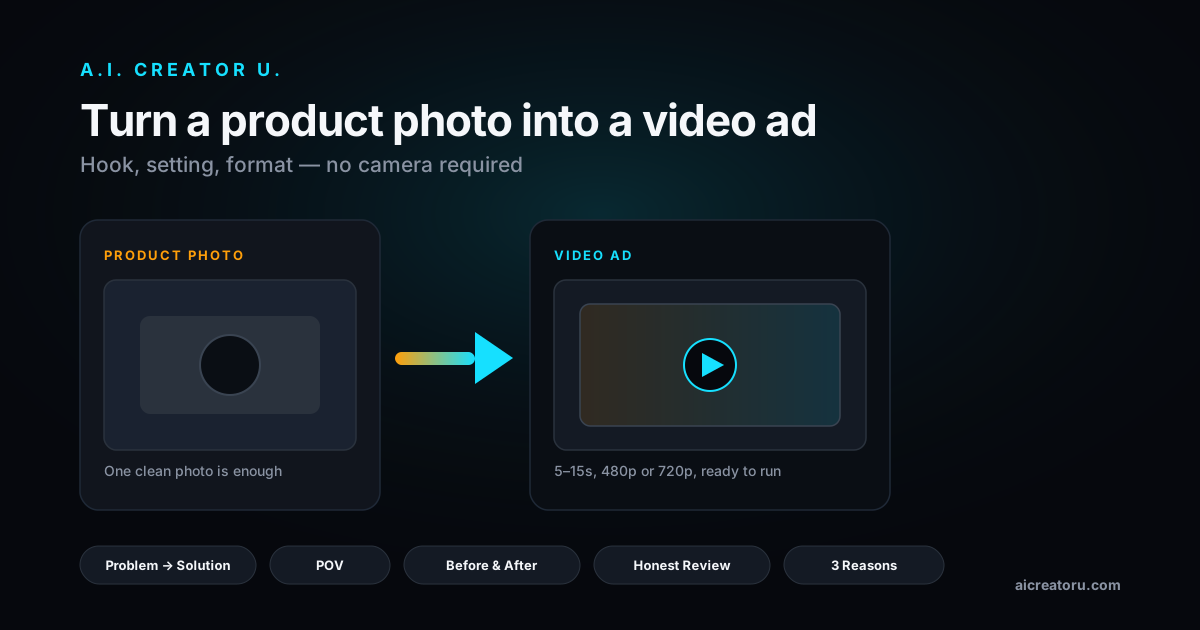
Quick answer: you don't need a camera, a model, or a studio to turn a product photo into a scroll stopping video ad. Upload one clear photo to an AI video ad tool, let it read the product, then generate a short clip with a hook, a setting, and native motion (Seedance 2 is the engine most of these tools run on under the hood). A.I. Creator U's Studio Zero does this natively: upload a photo, pick a hook and format, and you get a 5 to 15 second video ad in minutes, no filming required.
That's the short version. The long version, including which hooks actually work, which settings kill your click through rate, and the exact workflow, is below.
Why "photo to video" beats a slideshow
A lot of tools that claim to "turn photos into video" just Ken Burns your image, pan and zoom it, slap a caption on top, and call it done. That's not a video ad. That's a slideshow with extra steps, and shoppers can tell the difference in about half a second.
Real photo to video AI generates new motion: the product actually moves, a hand actually picks it up, the light actually shifts. Under the hood this runs on image to video models like Seedance 2, which take your still photo as a reference and generate frames that keep the product looking exactly like your photo while adding camera movement, environment, and (with the right model) native audio in the same pass.
That distinction matters because static-vs-motion is the whole point. One 2026 analysis found video ads convert 20 to 40 percent higher than static images for products that need demonstration, and Shopify sellers who moved from photo only to video enhanced listings reported roughly a 34 percent lift in conversion. Amazon listing data shows pages with video hold shoppers 3.6x longer than photo only pages. None of that works if your "video" is a photo with a pan effect.
The framework: photo in, ad out
Here's the actual workflow inside Studio Zero, our product-photo-to-video tool. It's built around five decisions, and you can let AI make all of them or lock in the ones you care about.
- Upload the photo. One clean shot of the product is enough. Studio Zero scans it (and, if you give it one, your product URL) to pull the product name, brand, category, and key benefits automatically, so you're not typing a brief from scratch.
- Pick a format. Formats map to ad styles: UGC-style, tutorial, product review, virtual try-on, hyper-motion, TV spot, unboxing, or "wild card" if you want something unexpected. Pick the one that matches how your buyer actually shops.
- Pick a hook. This is the first 1 to 2 seconds, the part that decides whether someone keeps scrolling. Options include Problem to Solution, Before and After, POV, Honest Review, Did You Know, Storytime, and 3 Reasons.
- Pick a setting. Where the ad "lives": bedroom, kitchen, bathroom vanity, outdoors, studio, car, gym, or cafe. Match the setting to where your product actually gets used, that's the single biggest realism lever.
- Set duration and resolution, then generate. Short (5s), medium (10s), or long (15s), at 480p or 720p HD. Hit generate, or hit "Let AI direct it" and the tool fills in whatever you left blank, writes the script, and renders. Either way, cost is shown in credits before you commit, based on the length and resolution you picked.
That's it. No script writing, no actor, no lighting kit, no editing timeline.
Manual filming vs. slideshow tools vs. AI video generation
| Approach | Cost per video | Turnaround | What you get |
|---|---|---|---|
| Hire a videographer / UGC creator | $150 to $1,000+ | Days to weeks | Real footage, real actor, high variance in quality |
| "Photo to video" slideshow apps | Free to cheap | Minutes | Pan/zoom on a static image, no real motion, feels cheap |
| AI product photography only | Low | Minutes | A better still photo, still static, still no video |
| AI video ad generator (Studio Zero) | Credit based, scales with length/resolution | Minutes | Real generated motion, multiple hooks/formats to test, no shoot required |
The honest tradeoff: filming a real creator still wins for a hero brand video you'll run for months. But for testing five hooks against your actual product this week, at ecommerce speed, AI generation is the only approach where the math works.
Which hook actually fits your product
Don't default to "Problem to Solution" for everything, that's the hook most sellers overuse and audiences are getting numb to it. A rough rule of thumb, based on what actually gets used across formats:
- Consumables and supplements: Before and After or Did You Know. People need to believe the transformation or the fact before they'll believe the CTA.
- Gadgets and tools: POV or Honest Review. Let the product demonstrate itself; skepticism is the objection you're fighting.
- Apparel and beauty: 3 Reasons or Storytime. These categories sell on identity, not just function.
- Anything with a clear problem: Problem to Solution still works, just don't use it as your only test.
Run at least two hooks against the same photo before you decide anything. The setting matters less than the hook for click through rate, but it matters more for watch time, an outdoor "gym" setting on a kitchen gadget will feel wrong even if the hook is strong.
The three mistakes that kill most AI video ads
Mistake one: skipping the product profile step. If you generate straight off a bare photo with no brand voice, no benefit bullets, no audience info filled in, the AI has to guess, and generic AI copy is instantly recognizable as generic AI copy. Spend the 30 seconds letting the tool scan your product page or fill in the profile fields. It shows up in every generation after that.
Mistake two: shipping one video. A single AI generated ad is a coin flip. Generate three or four with different hooks and formats, run them as a small test, and let the data pick the winner. This is the actual advantage AI has over a traditional shoot: you can afford to be wrong four times before you find the one that works, because each attempt costs credits, not a production day.
Mistake three: starting from a bad photo. The model can generate great motion, lighting shifts, and camera movement, but it can't fix a blurry, badly cropped, or poorly lit source image, it's working from what you gave it. If your product photo already looks like an afterthought, the video will too. Five minutes with a phone camera near a window beats a dark, cluttered warehouse shot every time.
What AI video ads still can't do
Worth saying plainly, since overselling this stuff is how trust gets burned: AI generated product video is not a replacement for a real customer testimonial, and it won't nail a genuinely novel product mechanism that needs to be explained in detail. It's also not going to give you six minutes of usable footage, these tools are built for short, punchy cuts, not a full explainer video. Where it wins is speed and volume: testing hooks, refreshing creative before it gets ad fatigue, and getting a decent video out for products that would otherwise never get filmed at all because the margin doesn't justify a shoot.
Where this fits with the rest of your ad stack
Video ads don't replace your static creative, they add a format the algorithm rewards. On TikTok specifically, the ad format itself has its own rules worth knowing before you export. And if you're running this for a dropshipping store rather than an established brand, the workflow shifts slightly, our dropshipping product video guide covers sourcing photos when you don't have the product in hand yet.
For the bigger picture on structuring a full video ad campaign (not just one clip), the AI video ads playbook is the place to start.
Ready to turn your first photo into a video ad? Try Studio Zero and generate your first ad in the next five minutes, no camera required.
FAQ
Do I need more than one product photo? No. One clear, well lit photo is enough to generate a video ad. More photos help if you want the tool to show the product from multiple angles or build a full ad set, but it's not required to get your first video out.
Will the product look exactly like my photo? That's the point of using an image to video model instead of a text-to-video one: your uploaded photo anchors what the product looks like, and the AI generates motion and environment around it rather than inventing a new product. Results are strongest with a clean, well lit, in-focus source photo.
How long should my video ad be? Start at 5 or 10 seconds for cold traffic. Attention spans on TikTok and Reels drop off fast in the first few seconds, so a tight hook beats a long story. Save 15 second cuts for retargeting audiences who already know the product.
Can I use these videos on Amazon and Shopify, not just social ads? Yes. A 480p or 720p generated video works fine for a Shopify product page video block or an Amazon A+ content video slot, just export at the aspect ratio and resolution that platform expects (most product pages want 16:9 or square, social feeds want 9:16).
Is this actually free? Generating a video ad costs credits based on length and resolution, shown to you before you generate, so there's no surprise charge. New accounts start with free signup credits to try the tool before paying for anything.