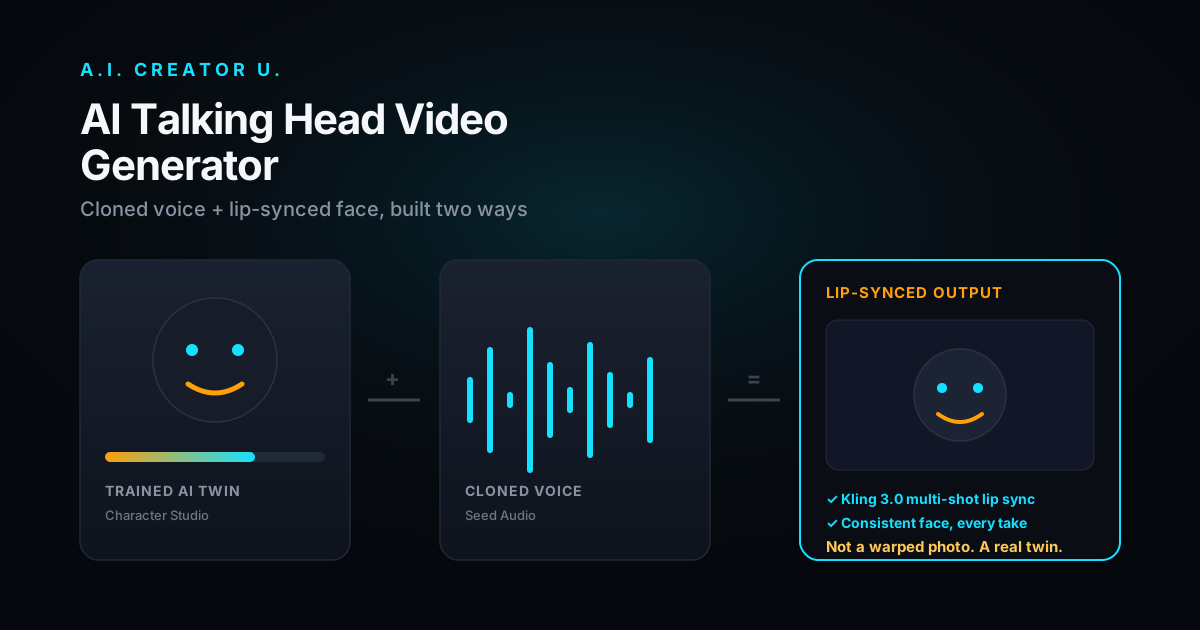
Quick answer: An AI talking head video generator turns a script into a video of a person (real or AI) speaking it on camera, using a cloned or synthetic voice paired with lip-synced facial animation. Most tools in this category (Synthesia, HeyGen, JoggAI) hand you a stock corporate avatar and a teleprompter. A.I. Creator U takes a different route: build a real AI twin of yourself in Character Studio, or animate any reference photo with Kling 3.0's lip sync inside Create Video, then pair it with a cloned voice from Seed Audio. You get a talking head that looks like a person, not a slide with a mouth moving.
Talking head videos are everywhere right now: LinkedIn thought-leader clips, product explainers, UGC-style ad hooks, course intros, customer support FAQs. The format works because a face saying something on camera converts better than text on a slide, full stop. But the tools built for it have a tell. Open any of the big corporate avatar platforms and you get the same 40 stock presenters in the same three outfits, reading your script in the same flat cadence. Fine for an internal training video. Dead on arrival for a TikTok ad or a founder's personal brand.
This guide covers what's actually happening under the hood when you generate a talking head video, the two ways to build one in A.I. Creator U, and where the format works (and where it quietly fails).
What is an AI talking head video generator, actually?
Strip away the marketing copy and every talking head tool does the same three things:
- Turns text into a voice. Either a cloned voice (your own, recorded once and reused) or a synthetic one.
- Animates a face to match that voice. This is the lip sync step, mapping phonemes to mouth shapes frame by frame.
- Renders it over a background. A studio set, a plain color, or a real location if the model supports scene generation.
Where tools differ is step 2. Cheaper platforms warp a static photo and call it done, which is why so many AI avatar videos have that slightly-wrong, waxy look. Better ones drive full video generation, so the head turns, blinks, and gestures like it's actually filming, not just a mouth pasted onto a portrait. That's the difference between "this is clearly a bot" and "wait, is that a real person?"
The two ways to build one here
A.I. Creator U doesn't have a single "talking head" button. Instead it has two tools that solve the problem from opposite directions, and which one you want depends on whether you're building a reusable persona or animating a one-off clip.
| Character Studio (AI twin) | Create Video, Kling 3.0 lip sync | |
|---|---|---|
| Best for | A recurring host, spokesperson, or your own on-camera double | A single clip from an existing photo or reference |
| Setup | Train once from your own photos/footage, reuse indefinitely | Upload a reference image or clip per project |
| Consistency | High. Same face, same look, every video | Depends on the reference you feed it |
| Voice | Pair with a cloned voice from Seed Audio | Pair with a cloned voice from Seed Audio |
| Good fit | Faceless-brand creators who want a recurring "face," agencies producing a client's spokesperson at scale | A quick product-ad hook, a one-off social clip, testing a script fast |
If you're building a channel, a brand, or a UGC pipeline you'll run week after week, Character Studio is the right call: train the twin once, generate as many scripts against it as you need without re-uploading reference material every time. If you just need one clip animated fast, Create Video's Kling 3.0 mode handles the lip sync directly against a reference image or video, no persona setup required. Kling 3.0 is one of four models available in Create Video alongside Seedance 2.0, VEO, and Grok, and it's the one built specifically for the multi-shot, character-consistent work talking heads need. We wrote a full breakdown of the Kling lip sync workflow if you want the mechanics.
Step by step: your first talking head video
- Write the script short. 20 to 40 seconds of spoken word is 60 to 100 words. Read it out loud before you generate anything. If you stumble on a phrase, the AI voice will too.
- Clone or pick a voice in Seed Audio. If you're building a personal brand, clone your own voice once and reuse it everywhere. It's the single biggest thing that makes an AI talking head feel like you and not a generic narrator.
- Choose your route. Reusable persona → Character Studio, train the twin from a handful of clear reference photos. One-off clip → Create Video, upload a reference image and select Kling 3.0.
- Feed in the script and voice, generate, review the lip sync closely on the first 3 seconds. That's where viewers decide whether it's convincing.
- Cut it to the platform. Vertical 9:16 for TikTok/Reels/Shorts, add captions (most viewers watch muted), and trim any dead air at the start. A talking head video that opens with silence loses half its audience before the mouth even moves.
- Export and reuse. If you built a Character Studio twin, save it. Every future script becomes a five-minute job instead of a re-upload.
Where talking heads actually work, and where they don't
Here's the part most "best AI talking head generator" roundups skip: the format has a ceiling, and pretending it doesn't do the format a disservice.
It works well for: product explainers, onboarding and training content, LinkedIn/thought-leadership clips, FAQ and support content, course intros, and UGC-style ad hooks where a face talking directly to camera outperforms a voiceover-over-B-roll edit.
It struggles with: anything that needs to show rather than tell. A talking head can describe a feature; it can't demonstrate one. Pair it with actual product footage or Seedance 2.0 b-roll instead of stretching a single talking-head shot across a 60-second ad. It also struggles with long-form. Ten minutes of one face talking is a podcast with extra steps; nobody's watching for the lip sync at that point, they're watching for the content, so don't over-invest in avatar polish for long-form and under-invest in what's actually being said.
The honest take: a talking head is a hook and a trust signal, not a whole video. The best UGC and ad creative we've seen mixes three to five seconds of a talking head opening a script, then cuts to product shots, screen capture, or b-roll for the rest. If you're building ad creative specifically, our AI Spokesperson Video Generator guide covers that hybrid structure in more detail, and Studio Zero is built for stitching a spokesperson clip together with product shots without touching an editor.
A note on faces and consistency
If your channel or brand depends on the same face appearing across dozens of videos, don't rebuild that face from scratch every time. That's the exact problem Character Studio solves: train the twin once from reference photos, and every subsequent video pulls from the same trained identity instead of drifting slightly each generation, which is the tell that gives away most "AI influencer" content. We go deeper on building a consistent recurring persona in our AI Influencer Generator guide, which covers the identity-consistency problem from the character side rather than the lip-sync side.
Common mistakes that give away the AI
Most bad talking head videos fail for the same handful of reasons, and none of them are "the model isn't good enough."
Writing the script like it's an email. Spoken language and written language aren't the same thing. Sentences with three clauses and a semicolon read fine on a page and sound robotic out loud. Write the way you'd actually say it, contractions and all, then read it out loud once before you generate.
Skipping the voice clone. A stock synthetic voice paired with your own face is the single biggest mismatch signal viewers pick up on, even if they can't articulate why something feels off. If you're building a recurring persona, clone the voice once in Seed Audio and reuse it. It takes a few minutes and it's the highest-leverage step in the whole pipeline.
Using a bad reference photo or clip. Lighting matters more than resolution. A well-lit, front-facing, neutral-expression reference gives Kling 3.0 or Character Studio far more to work with than a high-res photo shot at an angle in bad light. If a generation comes back with weird mouth artifacts, swap the reference before you touch anything else.
Making the whole video one static shot. Even a great talking head clip gets boring past 15 to 20 seconds if nothing else is happening on screen. Cut in b-roll, product shots, or text overlays around the talking segments instead of asking one shot to carry an entire ad.
Forgetting captions. Most social platforms default to muted autoplay. A talking head video without burned-in captions is losing the majority of its potential watch time before anyone even hears the voice you spent time cloning.
FAQ
Is an AI talking head video generator free to use? A.I. Creator U gives every new account 15 free credits on signup, enough to test the Character Studio and Create Video workflows before you commit to anything. Beyond that it runs on credits, and the exact cost per generation depends on the model and clip length, so check the live pricing page for current numbers rather than trusting anything you read here or anywhere else that isn't dated today.
Can I use my own face and voice? Yes. That's the whole point of pairing Character Studio (your face, trained as a reusable twin) with a cloned voice from Seed Audio. It's the difference between "an AI avatar" and "an AI version of you."
Do I need to be on camera at all? No. You can animate a reference photo through Kling 3.0's lip sync without ever filming yourself, which is how a lot of faceless-brand creators build a consistent "host" without appearing on camera personally.
What's the difference between a talking head video and a UGC ad? A talking head video is just the format, a person speaking to camera. A UGC ad is a style, informal, phone-shot, testimonial-feeling. You can build UGC-style ads using talking head clips as the hook, which is exactly what our UGC tools roundup and Studio Zero are built for.
Why does the lip sync look slightly off on some clips? Lip sync quality is sensitive to your reference material. A clear, front-facing, well-lit reference photo or clip gives the model far more to work with than a blurry angle shot. If a generation looks off, the fastest fix is usually a better reference, not a different model.
Build your first one
Talking head video isn't going away, but the stock-avatar version of it is getting easy to spot and easy to ignore. If you want the format to actually convert, pair a real trained persona with a model built for character consistency instead of a warped photo reading a script. Start in Character Studio if you're building something recurring, or jump into Create Video and try Kling 3.0's lip sync on a single clip first. Either way, 15 free credits cover your first test.